


Greetings from the Salesforce world! You’re in the perfect place if you’re new to Salesforce or want to learn more about its features. We’ll look at OWD (Organization-Wide Default), one of Salesforce’s most crucial security settings, in this article. You’ll discover what it is, how it affects the security of your data, and why it’s important for both novices and businesses that use Salesforce. Are you prepared to jump right in? Come on!
What is OWD in Salesforce?
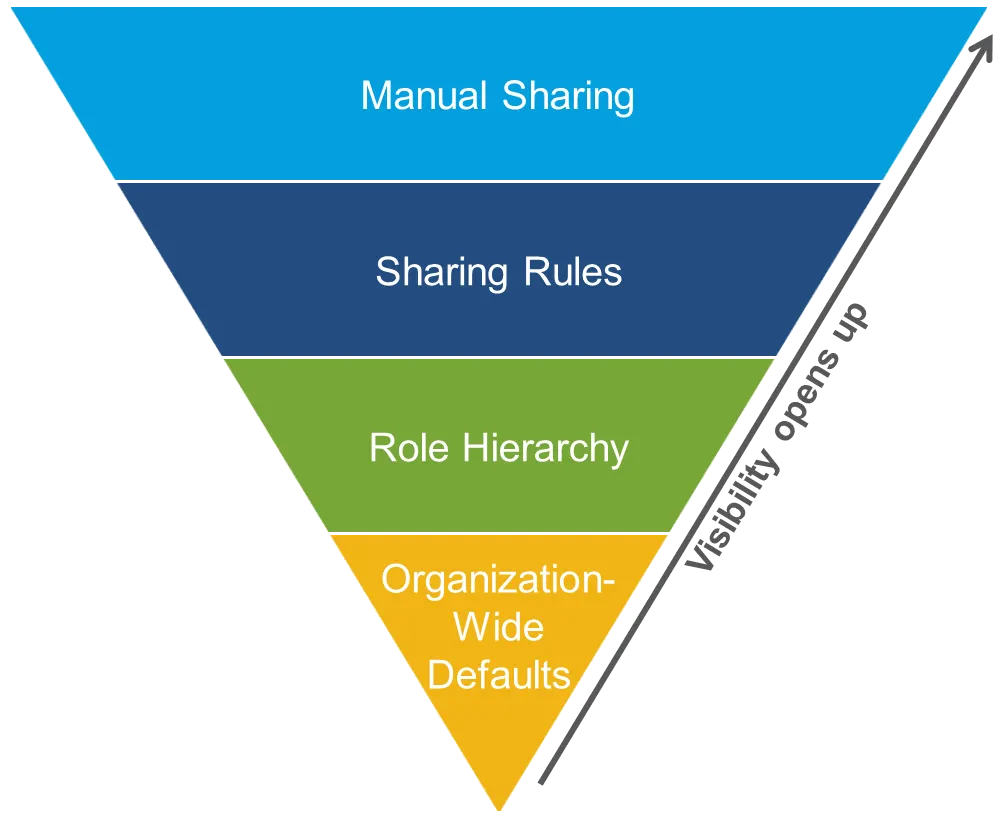
OWD (Organization-Wide Default) in Salesforce is the default level of access that users have to the platform’s records. It lays the groundwork for your organization’s data security settings and specifies who has the ability to view, amend, or remove records.
Consider it the initial line of defense for the private information of your business. It reduces the possibility of unwanted access by making sure that only the appropriate individuals—be they teams, departments, or users—can access particular records.
Rules for record sharing and data management are established by OWD settings, which apply to all users in your business and regulate visibility at the object level (e.g., accounts, contacts, opportunities). You can adjust these parameters to provide the appropriate amount of access based on your company needs.
Why is OWD Important for Your Salesforce Security?
Understanding OWD is essential for preserving data security and making sure your team operates effectively, whether you’re a Salesforce novice or an employee of the organization. You’re safeguarding confidential data and guaranteeing adherence to corporate regulations by configuring OWD appropriately. OWD is an essential tool for every Salesforce administrator, since market trends indicate that companies are placing a greater emphasis on security in CRM systems.
Salesforce’s versatility is its greatest feature. Salesforce enables administrators to design more detailed security measures, allowing you to strike a balance between security and openness, even though the OWD settings provide a default level of control.
OWD Settings Explained
Now that we understand what OWD is, let’s break down the key settings you can configure within Salesforce. The default OWD settings include:
- Public Read/Write: Anyone in your organization can view and edit records.
- Public Read Only: Anyone can view records, but only the owner or users with higher access can edit them.
- Private: Only the owner of the record or users with explicit sharing access can view or edit the record.
- Controlled by Parent: Access to records is controlled by the parent record (e.g., access to Opportunity records is based on access to the Account).
Each of these settings can be customized depending on your organization’s needs. For example, if you have sensitive financial data, you might set your records to Private to limit visibility. On the other hand, for non-sensitive records, Public Read Only or Public Read/Write might be appropriate.
Real-World Example: How OWD Helps Secure Data
To demonstrate the significance of OWD, let’s look at a real-world example. Consider yourself a member of a company’s sales team. A group of salesmen on your team are in charge of overseeing various accounts. Each salesperson can only view and modify the records for the accounts they are assigned when OWD is set to Private. This stops someone from viewing or changing someone else’s work by accident or on purpose. Additionally, it guarantees the security of important client data.
The CEO may, however, require access to every account in the company. Even if the OWD is set to Private in this situation, they can be granted higher-level access using sharing rules or by utilizing the “View All” and “Modify All” rights.
This flexibility is what makes OWD settings so powerful!
Tips for Managing OWD Settings Effectively
- Recognize Your Business Needs: Consider how data should be shared inside your company before making any modifications. Do some departments require more restricted access to data, or are you working in a collaborative setting? Selecting the ideal OWD settings for your company can be made easier if you are aware of these requirements.
- Start with the Default Settings: To safeguard sensitive data, start with the Private OWD settings when you first set up Salesforce. To make sure the correct people have access to data at the right time, you can then utilize sharing rules to provide access as needed.
- Make Good Use of Sharing Rules: Sharing rules let you grant access to particular individuals or groups, but OWD establishes the standard. Without sacrificing overall security, use these to establish more specialized access levels.
- Review and Modify Often: Make sure your OWD settings are in line with your organization’s changing requirements by reviewing and adjusting them frequently when your team expands or business requirements change.
The Bigger Picture: OWD and Your Salesforce Journey
Gaining proficiency with OWD settings is only one aspect of understanding Salesforce. Gaining knowledge about data security and access control as you advance in Salesforce will enable you to build a more effective and safe system for your group.
It’s not simply about locking down data, keep in mind. It all comes down to making sure the appropriate individuals have the authority to decide and perform effectively. OWD is a crucial tool in helping businesses scale and grow securely, which is the main goal of Salesforce.
Take Action: Start Your Salesforce Journey Today
We can help you if you’re eager to learn more about Salesforce security or delve further into more complex settings like sharing rules, permission sets, or profiles! See our advanced learning materials and courses for a step-by-step walkthrough of Salesforce’s more intricate capabilities.
Small stages, like comprehending OWD settings, are the first steps on the road to Salesforce mastery, and we’re here to support you at every turn. Become an expert in Salesforce and take charge of your data security and access instead of only being a user.
Unlock Salesforce’s full potential for your company by beginning your education now!
Conclusion
The fundamentals of Salesforce’s OWD (Organization-Wide Default) have been discussed in this blog. You can build up a safe and effective Salesforce environment for your company by knowing how OWD settings operate. We’re eager to see where your Salesforce journey leads you, and this information is an essential first step.
To delve deeper into other capabilities and begin controlling your data security settings right now, check out our advanced Salesforce resources!
you may be interested in this blog here:-
Oracle enterprise Data management (EDMCS)
SAP ABAP – Unveiling the Journey from Basic to Advanced OData Services
Generative AI in Manufacturing Industries: My Journey to Production Line Optimization
C++ Programming Course Online – Complete Beginner to Advanced
Why Salesforce is a valuable tool for IT companies
Error: Contact form not found.


 WhatsApp us