
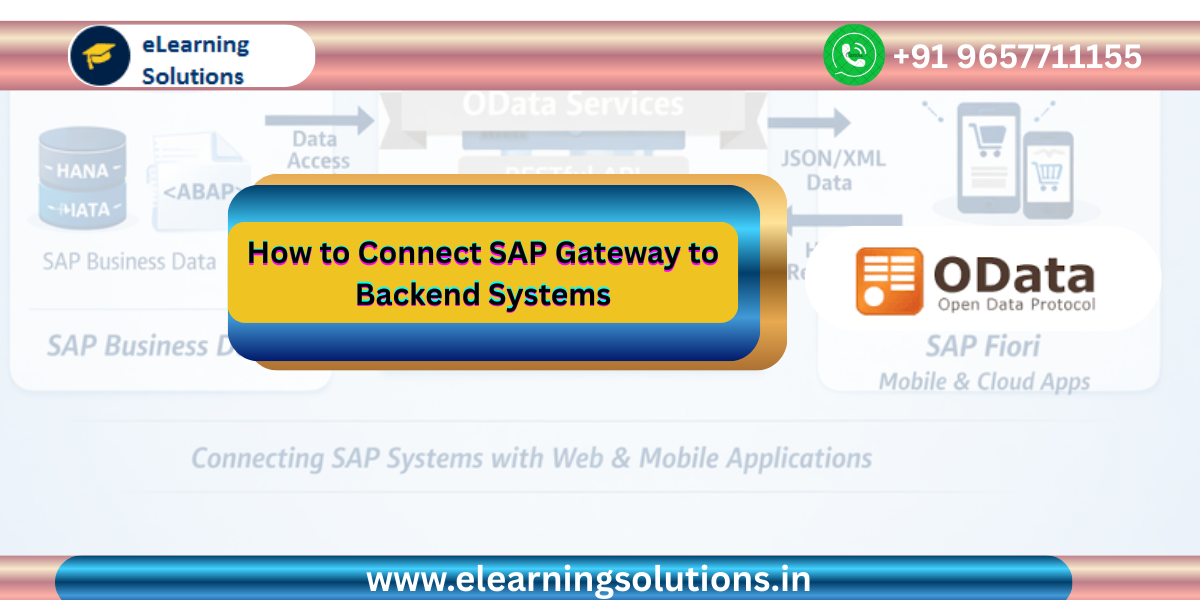
Introduction to SAP Gateway Backend Connectivity
SAP NetWeaver Gateway plays a critical role in modern SAP architectures. It enables communication between SAP backend systems and external applications such as SAP Fiori, mobile apps, and web interfaces. Through the use of OData services, SAP Gateway allows business data to be accessed securely and efficiently from multiple platforms. However, before these services can retrieve data from SAP systems, the Gateway must be properly connected to backend systems such as SAP ERP, SAP CRM, or SAP SRM. This connection ensures that when a user interface sends a request through an OData service, the request is forwarded to the correct backend System where the business logic and data reside. In this tutorial, we will explore how to connect SAP NetWeaver Gateway to backend systems step by step, understand the role of RFC destinations, and learn best practices for maintaining stable connectivity.
Understanding SAP NetWeaver Gateway Architecture
Before configuring the connection, it is important to understand how SAP Gateway fits into the overall SAP architecture. SAP NetWeaver Gateway acts as an intermediary layer between frontend applications and backend SAP systems. The frontend applications may include SAP Fiori apps, SAPUI5 applications, mobile applications, or third party web systems. These applications communicate with SAP Gateway using OData services.
When a request is sent from a user interface, SAP Gateway receives the request and processes it. It then forwards the request to the appropriate backend SAP system where the required data or business logic exists. Once the backend system processes the request, the response is returned through SAP Gateway to the user interface in formats such as JSON or XML.
This architecture improves security, simplifies integration, and allows companies to build flexible digital applications on top of their SAP systems.
Why Connecting SAP Gateway to Backend Systems is Important
SAP Gateway cannot retrieve data unless it is connected to backend SAP systems. These backend systems contain the actual business data such as sales orders, customer information, financial records, and inventory details.
Without this connection, OData services would not be able to perform operations such as retrieving data, creating records, updating information, or deleting entries. Therefore, configuring the connection between SAP Gateway and backend systems is one of the most important tasks during system setup.
This connection is established through RFC destinations. RFC stands for Remote Function Call and it allows SAP systems to communicate with each other securely.
Deployment Options for SAP Gateway
SAP NetWeaver Gateway supports two main deployment approaches. Understanding these deployment models helps determine how the connection to backend systems should be configured.
Hub Deployment
In the hub deployment model, the SAP Gateway system is installed on a separate server from the backend SAP system. The Gateway system acts as a central hub that handles requests from multiple frontend applications. These requests are then forwarded to backend systems through RFC connections.
This model provides better scalability and security because the Gateway layer is separated from the core business system. Many organizations prefer this deployment model when implementing SAP Fiori landscapes.
Embedded Deployment
In the embedded deployment model, SAP Gateway is installed directly inside the backend SAP system. In this scenario, the Gateway and backend system are part of the same environment.
Because both components run on the same system, the RFC connection points back to the same system. This deployment model is simpler to configure but may not offer the same level of separation as the hub architecture.
Step by Step Guide to Connect SAP Gateway to Backend Systems
Step 1 Open SAP Reference Implementation Guide
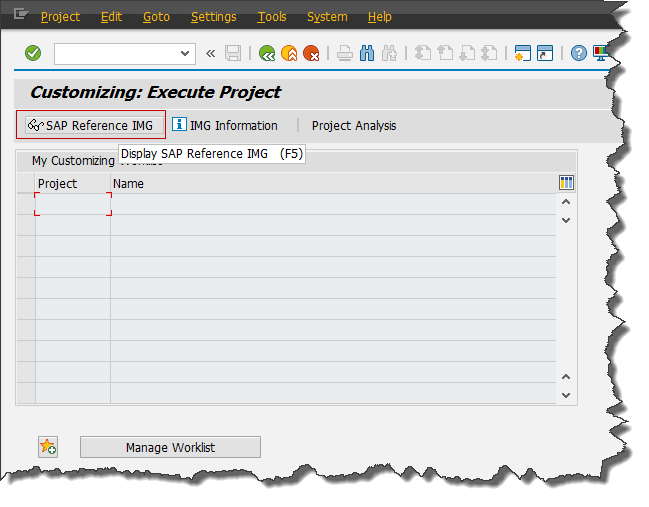
The first step in configuring the connection is to open the SAP Reference Implementation Guide.
Log in to the SAP system using SAP GUI. In the command field, enter transaction code SPRO and press Enter. Once the SPRO transaction opens, click on SAP Reference IMG. This section provides access to all configuration settings related to SAP NetWeaver components.
Step 2 Navigate to Gateway Configuration
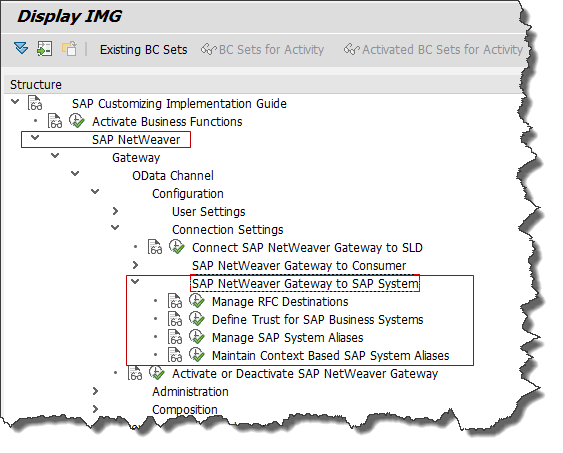
After opening SAP Reference IMG, follow the configuration path to reach the Gateway connection settings.
SAP NetWeaver
Gateway
OData Channel
Configuration
Connection Settings
SAP NetWeaver Gateway to SAP System
This configuration path allows administrators to define how the Gateway system communicates with backend SAP systems.
Step 3 Manage RFC Destinations
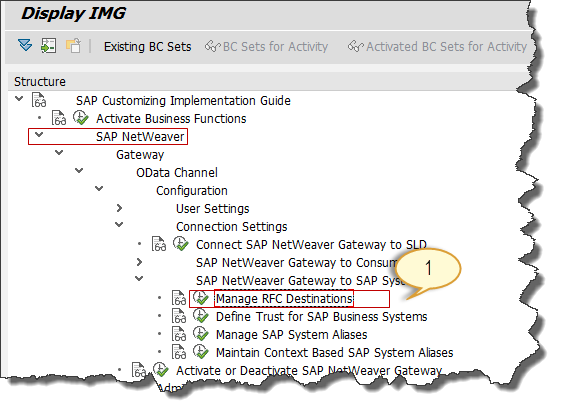
Within the connection settings configuration, you will find an option called Manage RFC Destination. Execute this option to configure RFC connections.
The RFC destination defines the communication settings between SAP Gateway and backend SAP systems. It includes information such as the target system, communication protocol, and authentication details.
Step 4 Create a New RFC Connection
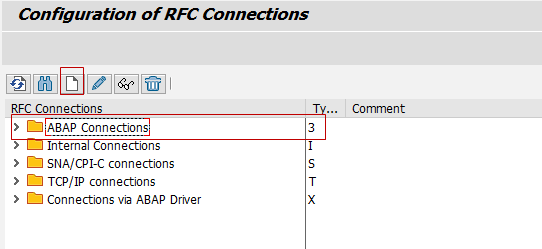
To connect SAP Gateway with a backend system, you need to create a new RFC destination.
Use transaction code SM59 to create the RFC connection. In the RFC destination configuration screen, create a new ABAP connection. Provide details such as the target host, system number, and client.
Enter valid login credentials and perform a connection test to verify that the RFC destination is working correctly.
Step 5 Configure Based on Deployment Type
The configuration of RFC destination depends on the deployment model being used.
If your system uses hub deployment, create an RFC connection that points to the backend SAP ERP system or any other backend system such as SAP CRM or SAP SRM.
If your system uses embedded deployment, create an RFC connection that points to the same system where SAP Gateway is installed.
After creating the RFC destination, save the configuration and verify the connection.
Verifying the Backend Connection
After configuring the RFC destination, it is important to verify that the Gateway system can successfully communicate with the backend system.
You can test the connection using the connection test feature available in transaction SM59. This test ensures that the Gateway system can connect to the backend SAP system without any communication errors.
Another way to verify the connection is by testing an OData service in the SAP Gateway Client. If the service successfully retrieves data from the backend system, it confirms that the connection is working properly.
Real World Example of SAP Gateway Backend Integration
Consider a company that has implemented SAP ERP for managing its business operations. The company wants to develop SAP Fiori applications that allow employees to view sales orders and customer data from mobile devices.
The SAP Fiori application sends requests to SAP Gateway through OData services. SAP Gateway then forwards these requests to the SAP ERP backend system through an RFC connection.
The backend system retrieves the requested data and sends it back to the Gateway system. Finally, the data is delivered to the Fiori application in JSON format.
This entire process happens within seconds, enabling users to access real time SAP data from modern user interfaces.
Common Issues During Gateway Connection Setup
Sometimes developers may face issues while connecting SAP Gateway to backend systems.
One common issue is incorrect RFC destination configuration. If the host name or system number is incorrect, the connection test will fail.
Another common problem is missing authorization for the RFC user. The user configured in the RFC destination must have sufficient permissions to access backend services.
Network connectivity problems can also affect the connection between systems. Firewall rules or network restrictions may prevent communication between SAP servers.
To avoid these issues, administrators should carefully verify all configuration details during setup.
Best Practices for SAP Gateway Connectivity
To maintain stable and secure communication between SAP Gateway and backend systems, organizations should follow several best practices.
Always use secure authentication methods for RFC connections.
Regularly monitor RFC connections using transaction SM59.
Implement proper authorization roles for RFC users.
Test Gateway services regularly to ensure backend connectivity remains stable.
Document all system configurations for easier troubleshooting and maintenance.
Following these best practices helps organizations maintain reliable SAP Gateway environments.
Conclusion
Connecting SAP NetWeaver Gateway to backend systems is a fundamental step in enabling OData services and modern SAP applications. By configuring RFC destinations and defining proper connection settings, organizations can ensure that SAP Gateway communicates effectively with backend systems such as SAP ERP, SAP CRM, and SAP SRM. This connection allows applications like SAP Fiori and SAPUI5 to access real time SAP business data through secure and standardized interfaces. Understanding how to configure and manage Gateway connectivity helps developers and administrators build scalable, efficient, and modern SAP landscapes.
you may be interested in this blog here:-
Don’t Fear the Update: Navigating the Challenges of how to implement sap note
Five Top Technology Investment Drivers for 2024
How many dollars worth of RSU does Salesforce typically offer an MTS (experienced hire) on joining?
Integration cloud system to HANA Cloud Platform using Cloud Connector


 WhatsApp us