
Modern SAP systems are designed to integrate seamlessly with web applications, mobile platforms, analytics dashboards, and enterprise software solutions. One of the key technologies that enables this integration is the Open Data Protocol, commonly known as OData. After modeling and implementing an OData service in SAP NetWeaver Gateway, the next essential step is registering the service so it can be accessed by external applications. Without registration, the service remains inactive and cannot be consumed by user interfaces such as SAP Fiori apps or third party integrations.
In this detailed guide, you will learn how to register your first OData service in SAP Gateway using a step by step approach. The tutorial explains the complete process, provides practical insights, and helps SAP developers and consultants understand how service registration works in real enterprise environments.
Understanding OData Service Registration in SAP
Before an OData service can be used by applications, it must be registered and activated in the SAP Gateway system. Service registration connects the service implementation with the Gateway framework and exposes the service endpoint so applications can access it using HTTP requests.
Registration is performed in the SAP Gateway Service Maintenance transaction. During the registration process, the system identifies the service created in the backend, assigns the service to a package, and activates it in the Gateway environment.
Once the service is registered successfully, developers can test it using the Gateway Client or integrate it with applications such as SAP Fiori, mobile apps, reporting tools, or cloud platforms.
Why Registering an OData Service is Important
Service registration is a mandatory step in the OData lifecycle. Even if a service is perfectly modeled and implemented, it cannot be used until it is registered in the Gateway system.
Registration provides several benefits.
It activates the service endpoint so applications can access it.
It links the service to the Gateway framework.
It allows testing through built in SAP tools.
It enables secure communication between the SAP backend and external systems.
Without completing this step, the OData service remains unavailable to users and applications.
Prerequisites Before Registering an OData Service
Before registering your service, make sure the following steps are already completed.
The OData service must be modeled using the Gateway Service Builder transaction SEGW.
The service implementation should be completed by writing ABAP logic in the Data Provider Extension class.
All classes and objects must be activated.
You should know the project name and service technical name.
Once these prerequisites are satisfied, the service can be registered in the Gateway system.
Step by Step Guide to Register an OData Service
Step 1 Open the Service Maintenance Transaction
To begin the registration process, open the SAP GUI and execute the following transaction code.
IWFND MAINT SERVICE
It is recommended to add the command prefix n before the transaction code if you are navigating from another screen.
This transaction opens the Gateway Service Maintenance interface where all registered services are managed.
Step 2 Click on Add Service
Inside the Service Maintenance screen, locate the Add Service button. Clicking this option allows you to search for services available in the backend system.
The system will open a search screen where you can enter parameters to locate the service created in the Gateway Service Builder.
Step 3 Search for the OData Service
In the search screen, enter the service name or leave the field empty to retrieve all services available in the system. Then click the Get Services button.
During this step, you must also specify the system alias depending on your deployment configuration.
If your Gateway system is deployed separately from the backend system, this is called a hub deployment. In this case, you need to provide the alias of the backend system.
If your Gateway and backend system are installed in the same environment, this is known as embedded deployment. In this scenario, you simply use LOCAL as the system alias.
After entering the correct parameters, the system will display a list of available services.
Step 4 Select the Service and Add It
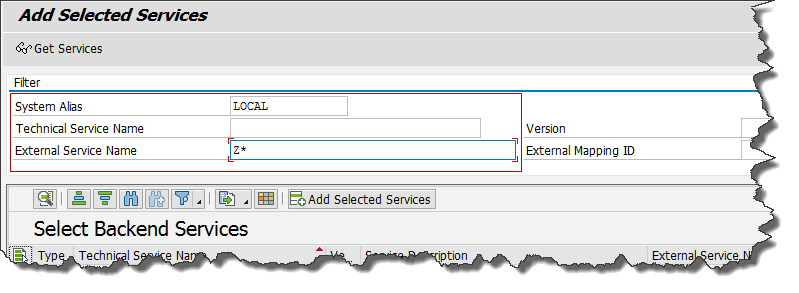
From the list of retrieved services, locate the service you created earlier. The service name typically follows the format ProjectName SRV.
Select the service and click the Add Selected Service button.
The system will then prompt you to confirm the registration details.
Step 5 Assign a Package
In the next screen, the system will request a development package assignment. Choose the appropriate package where your service configuration should be stored.
If you are working in a development or testing environment, you may assign the service to a local object. However, in production systems it is recommended to use proper transport packages to maintain system consistency.
Leave other configuration fields unchanged unless there is a specific requirement.
Click OK to continue.
Step 6 Confirm Service Registration
Once the package is assigned and the registration process is completed, the system will display a confirmation message indicating that the service has been registered successfully.
This confirmation ensures that the Gateway framework has activated the service and it is now ready for consumption.
Step 7 Verify the Registered Service
Return to the Service Maintenance transaction screen. You will now see the newly registered service listed in the service catalog.
The technical name of the service will appear in the format ProjectName SRV.
From this screen, you can access various service management options including activation status, metadata, and service testing tools.
Testing the Registered OData Service
After registering the service, it is important to test whether it is functioning correctly.
SAP provides a built in tool called the Gateway Client that allows developers to simulate HTTP requests and inspect responses.
To test the service, select the registered service in the Service Maintenance screen and choose the option to open the Gateway Client.
You can execute test queries such as retrieving metadata or fetching data from entity sets.
Successful responses indicate that the service registration and implementation are working correctly.
Real World Use Cases of OData Services
OData services play a crucial role in modern SAP landscapes. Organizations use them to connect SAP systems with various applications and technologies.
For example, SAP Fiori applications use OData services to retrieve business data such as sales orders, purchase orders, and customer information. Mobile applications rely on OData APIs to synchronize data with SAP backend systems. Business intelligence tools consume OData services to generate dashboards and analytics reports.
Cloud platforms also integrate with SAP through OData services to enable automation, reporting, and workflow management.
Because of this flexibility, OData has become one of the most widely used integration technologies in the SAP ecosystem.
Best Practices for OData Service Registration
To ensure smooth integration and system performance, developers should follow several best practices when registering services.
Always verify that the service implementation is fully activated before registration. Register services using proper development packages to maintain transport management across systems. Use clear and consistent naming conventions for projects and services. Regularly test services using the Gateway Client to identify issues early.
It is also important to manage system aliases carefully, especially in complex landscapes where multiple backend systems are connected to a central Gateway server.
Common Errors During Service Registration
Although the registration process is straightforward, developers sometimes encounter common issues.
One frequent problem occurs when the service is not activated in the Service Builder. In such cases, the service will not appear in the search results.
Another issue arises when the incorrect system alias is selected. This prevents the Gateway from locating the backend service.
Authorization problems can also occur if the user performing the registration does not have the required permissions.
Most of these issues can be resolved by verifying activation status, checking system configuration, and ensuring proper user roles.
Benefits of Using OData in SAP Integration
OData provides several advantages for enterprise systems. It uses standard HTTP protocols, making it compatible with web technologies. It supports structured data formats such as JSON and XML. It allows developers to perform Create, Read, Update, and Delete operations easily.
Most importantly, OData enables SAP systems to interact with modern digital platforms without complex middleware development.
This capability makes it a critical technology for digital transformation and enterprise application development.
Final Thoughts
Registering an OData service is a crucial step in making SAP data accessible to applications and users. Once the service is registered in the Gateway system, it becomes available for testing, integration, and real time data exchange.
By following the structured process outlined in this guide, SAP developers can quickly activate their services and ensure reliable connectivity between SAP systems and external applications.
As organizations increasingly adopt cloud platforms, mobile applications, and advanced analytics tools, mastering OData service registration becomes an essential skill for SAP professionals.
With proper configuration, testing, and best practices, OData services can power modern enterprise applications and enable seamless digital integration across business systems.
YOU MAY BE INTERESTED IN
ABAP Evolution: From Monolithic Masterpieces to Agile Architects
A to Z of OLE Excel in ABAP 7.4




 WhatsApp us