
In previous SAP NetWeaver Gateway tutorials, we primarily focused on reading data from back-end systems using OData services. While reading data is essential, modern enterprise applications also require the ability to create, update, and delete data directly through OData. These operations are supported using the CREATE, UPDATE, and DELETE methods in OData services. In this tutorial, we will focus on the UPDATE operation, demonstrating how to modify existing data in the back-end SAP system. The example used will update the currency code of an existing Sales Order.

Why Update Operation Matters
In business processes, values such as currency, quantity, or status often change after a document is created. Enabling UPDATE operations through OData allows users to interact directly with SAP data from web applications, mobile apps, or integration tools. This reduces manual intervention and ensures real-time data consistency.
For example, a sales order initially created in EUR may need to be changed to INR based on customer requests or exchange rate adjustments. OData UPDATE allows this change programmatically.
Step 1: Open Service Builder
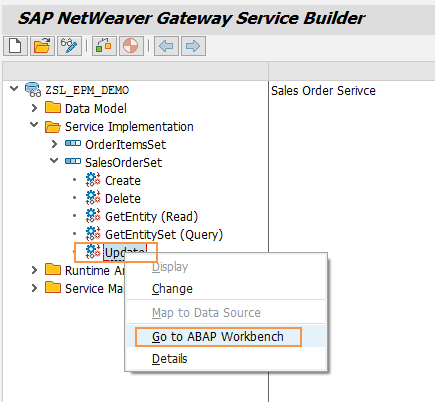
Navigate to transaction SEGW and open your existing OData project.
Go to Service Implementation → SalesOrderSet → Update operation.
Right click and choose Go to ABAP Workbench to access the Data Provider Extension (DPC_EXT) class.
Step 2: Redefine the Update Method
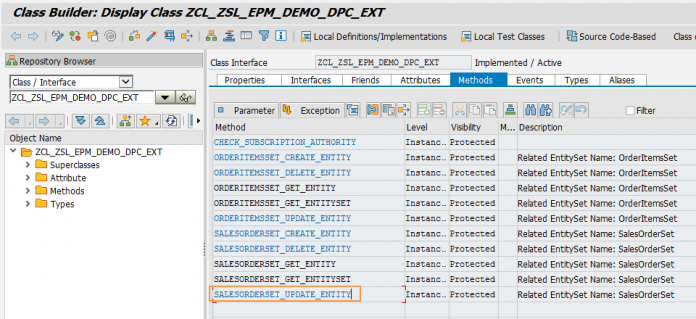
Put the DPC extension class in change mode.
Locate the method SALESORDERSET_UPDATE_ENTITY() and click Redefine.
This method handles the logic for updating data in the back-end system when the OData service receives a PUT request.
Step 3: Understand Method Parameters
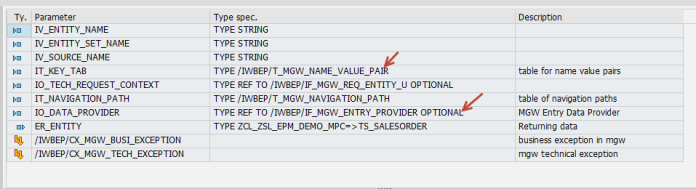
Two parameters are key in this method:
IT_KEY_TAB: Contains the key field values identifying the record to update, such as the Sales Order number.
IO_DATA_PROVIDER: Contains the new data values to be updated in the back-end.
For our example, IT_KEY_TAB contains the Sales Order number 500000002, and IO_DATA_PROVIDER contains the new currency code INR.
Step 4: Write ABAP Code for Update
The following ABAP code demonstrates updating the currency code of a Sales Order:
DATA: lwa_key_tab           TYPE /iwbep/s_mgw_name_value_pair,
      lv_so_id              TYPE bapi_epm_so_id,
      ls_salesorder         LIKE er_entity,
      ls_headerdata         TYPE bapi_epm_so_header,
      ls_headerdatax        TYPE bapi_epm_so_headerx,
      lt_return             TYPE STANDARD TABLE OF bapiret2.* Step 1: Get Sales Order number
READ TABLE it_key_tab INTO lwa_key_tab WITH KEY name = 'SoId'.
IF sy-subrc = 0.
  lv_so_id = lwa_key_tab-value.
ENDIF.* Alpha Conversion
CALL FUNCTION 'CONVERSION_EXIT_ALPHA_INPUT'
  EXPORTING
    input  = lv_so_id
  IMPORTING
    output = lv_so_id.* Step 2: Read the new data from the service
io_data_provider->read_entry_data( IMPORTING es_data = ls_salesorder ).* Get current Sales Order details
CALL FUNCTION 'BAPI_EPM_SO_GET_DETAIL'
  EXPORTING
    so_id      = lv_so_id
  IMPORTING
    headerdata = ls_headerdata.* Step 3: Update currency code
ls_headerdata-currency_code  = ls_salesorder-currency_code.ls_headerdatax-so_id          = lv_so_id.
ls_headerdatax-currency_code  = 'X'.CALL FUNCTION 'BAPI_EPM_SO_CHANGE'
  EXPORTING
    so_id         = lv_so_id
    soheaderdata  = ls_headerdata
    soheaderdatax = ls_headerdatax
  TABLES
    return        = lt_return.
This code reads the key, fetches existing data, updates the required field, and calls the BAPI to persist changes.
Step 5: Activate and Test the Service
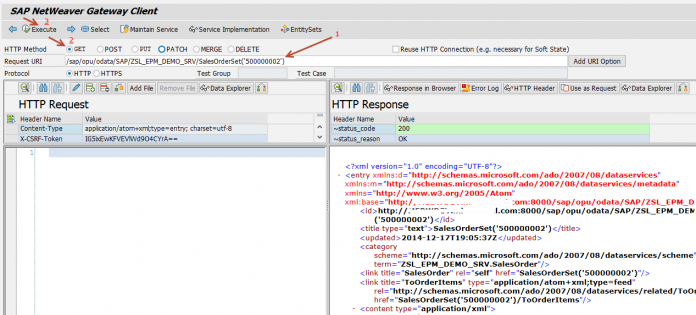
Activate the Data Provider Class (DPC_EXT) after implementing the update logic.
Use SAP NetWeaver Gateway Client (/IWFND/GW_CLIENT) for testing.
Step 5a: Retrieve Current Data
Perform a GET request to fetch the existing Sales Order data:
/sap/opu/odata/SAP/ZSL_EPM_DEMO_SRV/SalesOrderSet('500000002')
Step 5b: Use HTTP Body as Request
Click the “Use As Request” button to copy the response body to the left panel.
Modify the currency code field from EUR to INR.
Switch the HTTP method to PUT.
Step 5c: Execute Update
Execute the PUT request.
If successful, the service returns HTTP 204, indicating the data was updated without returning a payload.
Step 5d: Verify Update
Check the back-end table (SNWD_SO) to confirm the currency code is updated to INR.
Best Practices for OData Update Operations
Always validate input data before updating
Use conversion functions for key fields
Implement error handling for BAPI returns
Test updates on non-production systems first
Document changes for maintainability
Monitor HTTP responses to handle success and failure scenarios
Common Issues and Solutions
HTTP 400 or 500 errors: Check payload formatting and field mapping
No update occurs: Ensure BAPI is called with correct header and X structure
Incorrect key field: Validate IT_KEY_TAB contains correct Sales Order number
Authorization issues: Verify user roles allow update operations
Conclusion
The UPDATE operation in SAP NetWeaver Gateway OData allows developers to modify back-end data securely and efficiently. By redefining the update method, implementing ABAP logic, and using the Gateway Client for testing, you can ensure accurate updates to fields like currency, quantities, or other transactional information. Mastery of OData CRUD operations expands your ability to develop interactive, real-time enterprise applications.
YOU MAY BE INTERESTED IN
How to Convert JSON Data Structure to ABAP Structure without ABAP Code or SE11?
ABAP Evolution: From Monolithic Masterpie




 WhatsApp us