

Efficient data retrieval is key to building high-performance SAP applications. OData services provide query options to control and customize the data returned by the backend. One of the most useful query options is $orderby. This option allows you to sort collections or entity sets in ascending or descending order based on entity fields. Implementing $orderby correctly ensures that users receive data in the desired order without additional sorting on the client side.
What Is $orderby Query Option
The $orderby query option adds sorting capabilities to SAP NetWeaver Gateway OData services. It enables developers to specify which fields to sort by and whether the order should be ascending or descending. By default, OData services return data in the order it is retrieved from the backend. $orderby provides the flexibility to customize the sequence of returned records efficiently.
Supported System Version
The $orderby query option is supported in SAP NetWeaver Gateway Release 2.0 Support Package 03 and above. Using older versions may not provide full sorting functionality, so always check system compatibility.
Business Example
Imagine an OData service fetching all products from the backend system. By default, products are returned in the order they exist in the database. Users may want products sorted by price, name, or creation date. For example, you may need products sorted by Price in descending order. $orderby allows this directly in the OData request, saving time and improving client performance.
Syntax of $orderby Query Option
The general syntax is:
server port sap opu odata sap service name ProductsSet orderby FieldName sortorder
FieldName is the property in the entity to sort by.
SortOrder can be either asc for ascending or desc for descending.
Example
server port sap opu odata sap service name ProductsSet orderby Price desc
You can sort by multiple fields by separating them with commas. For example:
server port sap opu odata sap service name ProductsSet orderby Price desc Name asc
How to Implement $orderby Query Option in OData Service
Step 1 Open Service Builder
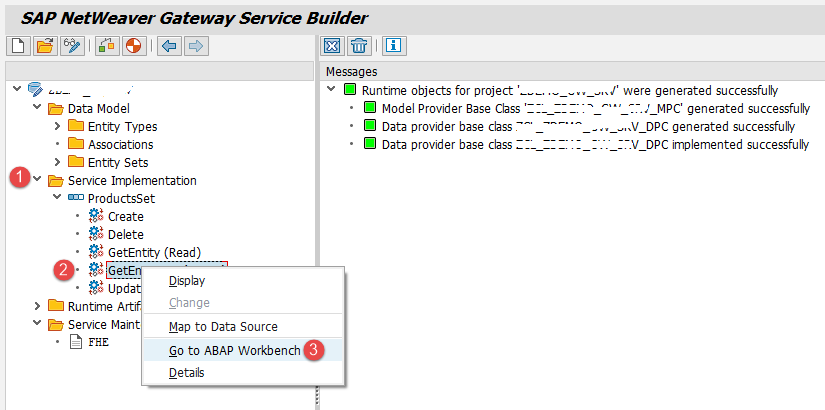
After creating the OData service, open Service Builder SEGW. Navigate to the ABAP Workbench for the entity set you want to enable sorting on, such as the Product entity set.
Step 2 Existing Code Before $orderby Implementation
DATA lt_products TYPE STANDARD TABLE OF bapi_epm_product_header
DATA ls_products TYPE bapi_epm_product_header
DATA es_entityset TYPE zcl_zdemo_gw_srv_mpc ts_products
DATA lv_max_rows TYPE bapi_epm_max_rows
lv_max_rows bapimaxrow = 10
CALL FUNCTION BAPI_EPM_PRODUCT_GET_LIST
EXPORTING max_rows = lv_max_rows
TABLES headerdata = lt_products
IF lt_products IS NOT INITIAL
LOOP AT lt_products INTO ls_products
MOVE CORRESPONDING ls_products TO es_entityset
APPEND es_entityset TO et_entityset
ENDLOOP
ENDIF
This code fetches product data using a maximum row limit but does not yet support sorting.
Step 3 Access $orderby Parameters
The $orderby query options are available through the importing parameter IT_ORDER in the Data Provider Class. You can read the field names and sort order from this table.
Step 4 Implement Sorting Logic
DATA ls_order TYPE iw b e p s mgw_sorting_order
DATA lt_products TYPE STANDARD TABLE OF bapi_epm_product_header
DATA ls_products TYPE bapi_epm_product_header
DATA es_entityset TYPE zcl zdemo gw srv mpc ts_products
DATA lv_max_rows TYPE bapi_epm_max_rows
lv_max_rows bapimaxrow = 10
CALL FUNCTION BAPI_EPM_PRODUCT_GET_LIST
EXPORTING max_rows = lv_max_rows
TABLES headerdata = lt_products
IF lt_products IS NOT INITIAL
LOOP AT lt_products INTO ls_products
MOVE CORRESPONDING ls_products TO es_entityset
APPEND es_entityset TO et_entityset
ENDLOOP
ENDIF
- Get the Order by field name
READ TABLE it_order INTO ls_order WITH KEY property = Price
IF sy subrc = 0
CASE ls_order-order
WHEN asc
SORT et_entityset BY price ASCENDING
WHEN desc
SORT et_entityset BY price DESCENDING
WHEN OTHERS
ENDCASE
ENDIF
This logic retrieves all products and applies the sorting based on the specified field and order.
Step 5 Testing the $orderby Query
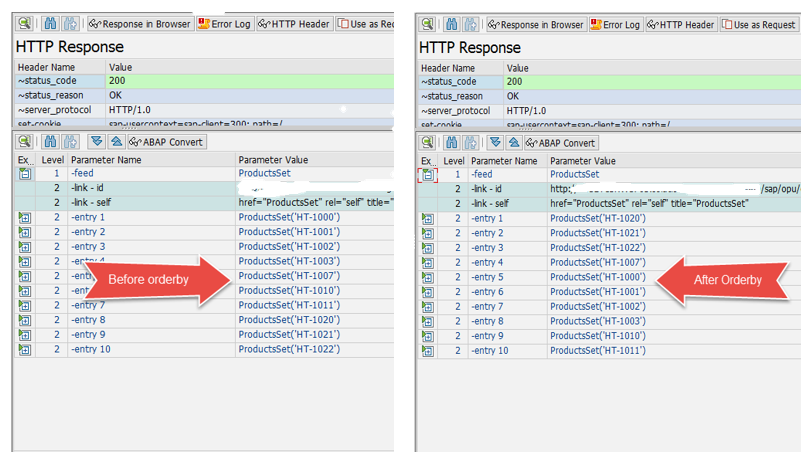
Use the SAP Gateway Client transaction IWFND GW CLIENT to test the service. First, execute the service without $orderby. All products are returned in default order. Then test using the query:
sap opu odata sap service name ProductsSet orderby Price desc
The response now returns products sorted by Price in descending order. You can add multiple fields to $orderby for complex sorting requirements.
Dynamic Sorting Implementation
Instead of statically declaring sort fields, you can handle dynamic sorting. Retrieve all order-by fields using the technical request context. Loop through each field and determine if it should be ascending or descending. Then append it to a sorting table and apply it on the entity set.
DATA lt_tech_order TYPE iw b e p s mgw_tech_order
DATA ls_tech_order TYPE iw b e p s mgw_tech_order
DATA otab TYPE abap_sortorder_tab
DATA oline TYPE abap_sortorder
lt_tech_order = io_tech_request_context->get_orderby( )
LOOP AT lt_tech_order INTO ls_tech_order
oline-name = ls_tech_order-property
IF ls_tech_order-order = desc
oline-descending = X
ELSE
oline-descending = space
ENDIF
APPEND oline TO otab
ENDLOOP
SORT et_entityset BY otab
Final Output
You now know how to implement the $orderby query option in SAP OData services. This allows for client-driven sorting of entity sets and enhances the flexibility of your services. By combining $orderby with other query options, such as $filter and $top, you can build highly efficient and responsive OData services.
Conclusion
$orderby is a vital feature for ordering data in SAP OData services. Implementing it in the Data Provider Class ensures the backend handles sorting efficiently. Proper usage enhances performance and improves user experience by delivering data in the requested sequence. Combine $orderby with other query options for maximum control over data retrieval.
YOU MAY BE INTERESTED IN
ABAP Evolution: From Monolithic Masterpieces to Agile Architects
A to Z of OLE Excel in ABAP 7.4




 WhatsApp us