
When working with large datasets in SAP OData services, server-side paging is essential for performance and usability. The $skiptoken query option allows you to retrieve data in chunks instead of loading all records at once. This method not only improves the response time but also reduces the load on the backend system. In this guide, we will explain the $skiptoken query option, its syntax, implementation in SAP NetWeaver Gateway, and how to test it effectively.
What Is $skiptoken Query Option
The $skiptoken query option is used in SAP OData services to control the number of entries returned in a single response. It enables server-side paging by dividing large datasets into smaller subsets. When a request exceeds the defined page size, the OData service provides a next link for the application to fetch subsequent entries. This approach ensures efficient data retrieval and better application performance.
Supported System Version
The $skiptoken query option is supported in SAP NetWeaver Gateway Release 2.0 Support Package 03 and above. Using this query option requires a properly built OData service that returns entity sets such as products, sales orders, or invoices.
Business Example
Suppose your OData service retrieves all products from the backend. Loading thousands of product entries in a single request can be slow and inefficient. By using $skiptoken, you can define a page size, such as 50 records per request. The service sends only the first 50 products along with a next link. The application can then request the next set of 50 products using the $skiptoken value.
Syntax of $skiptoken Query Option
The general syntax is:
server port sap opu odata sap service name ProductsSet skiptoken N
Where N represents the starting index for the next set of records. For example:
server port sap opu odata sap service name ProductsSet skiptoken 10
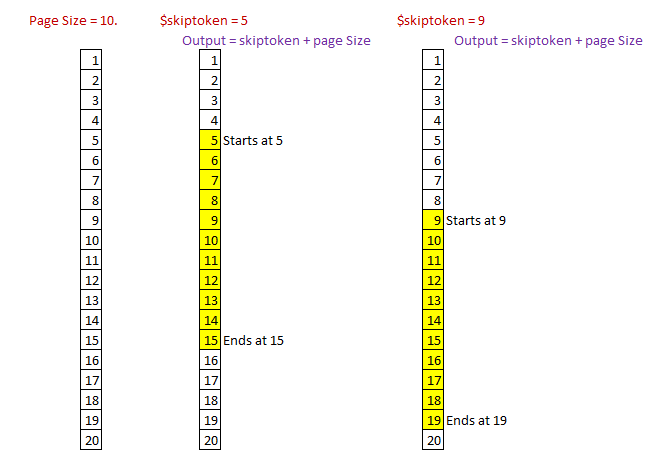
This syntax allows the application to fetch data in batches without overloading the client or server.
How It Works
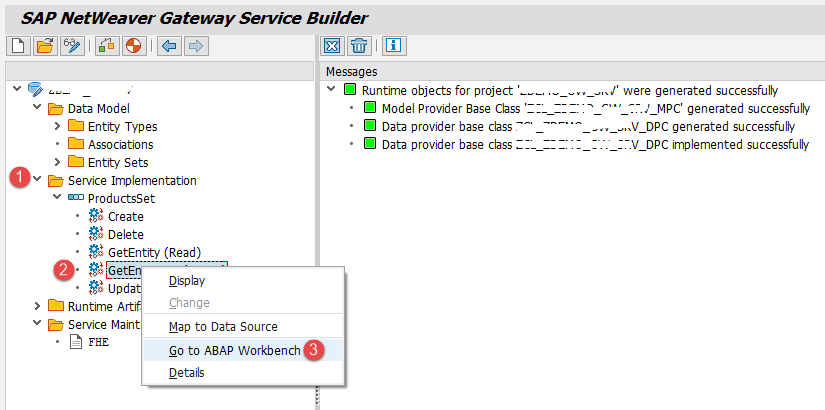
- Define the page size in the server in the GET_ENTITYSET method of the DPC_EXT class.
- Divide the entity set into chunks based on the page size.
- Send the requested subset of entries to the application based on the $skiptoken value.
- Provide a next link for subsequent requests.
Implementation of $skiptoken Query Option
Step 1: Prepare Existing OData Service
Assume that you already have an OData service retrieving a list of products. The initial code in the GET_ENTITYSET method may look like this:
DATA ls_order TYPE iw b e p s mgw_sorting_order
DATA lt_products TYPE STANDARD TABLE OF bapi_epm_product_header
DATA ls_products TYPE bapi_epm_product_header
DATA ls_entityset TYPE zcl zdemo gw srv mpc ts_products
DATA lt_entityset TYPE zcl zdemo gw srv mpc tt_products
DATA lv_max_rows TYPE bapi_epm_max_rows
- Check for $filter options
READ TABLE it_filter_select_options INTO ls_filter WITH KEY property = ProductId
IF sy subrc = 0
LOOP AT ls_filter-select_options INTO ls_select_options
MOVE CORRESPONDING ls_select_options TO ls_product_id
APPEND ls_product_id TO lr_product_id
ENDLOOP
ENDIF
CALL FUNCTION BAPI_EPM_PRODUCT_GET_LIST
TABLES headerdata = lt_products selparamproductid = lr_product_id
IF lt_products IS NOT INITIAL
LOOP AT lt_products INTO ls_products
MOVE CORRESPONDING ls_products TO ls_entityset
APPEND ls_entityset TO et_entityset
ENDLOOP
ENDIF
Step 2: Adjust Code for Paging
To implement $skiptoken, define a page size and calculate which subset of records to return:
DATA lv_page_size TYPE i VALUE 50
DATA lv_index_start TYPE i
DATA lv_skiptoken TYPE string
DATA lv_index_end TYPE i
DATA lv_table_size TYPE i
lv_skiptoken = io_tech_request_context->get_skiptoken( )
DESCRIBE TABLE lt_entityset LINES lv_table_size
IF lv_table_size IS INITIAL
CLEAR es_response_context-skiptoken
EXIT
ENDIF
IF lv_table_size < lv_page_size
et_entityset = lt_entityset
ELSE
lv_index_start = lv_skiptoken
lv_index_end = lv_skiptoken + lv_page_size
ENDIF
LOOP AT lt_entityset INTO ls_entityset
IF sy-tabix > lv_index_start AND sy-tabix <= lv_index_end
APPEND ls_entityset TO et_entityset
ENDIF
ENDLOOP
- Set Next Link
es_response_context-skiptoken = lv_index_end + 1
CONDENSE es_response_context-skiptoken
Step 3: Test the Service
Use the SAP Gateway Client transaction /IWFND/GW_CLIENT to test paging:
- Execute without $skiptoken to get all products.
- Execute with skiptoken = 0 to retrieve the first page.
- Execute with skiptoken = 10 to retrieve the next page.
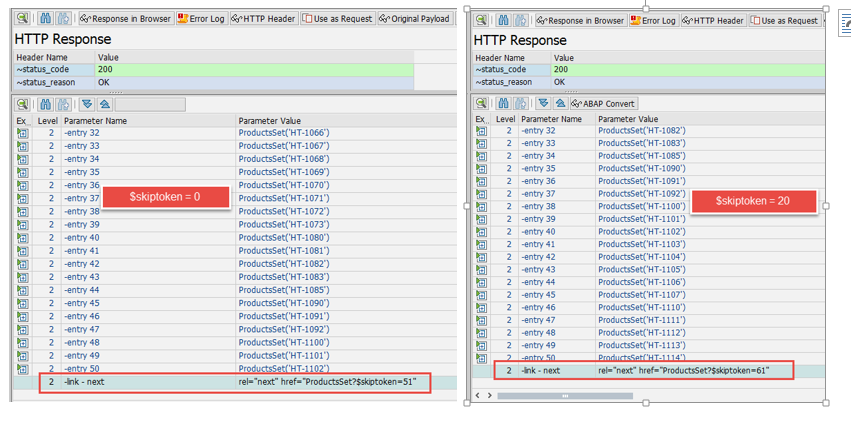
The service will return only the defined number of records per page along with a next link to continue fetching data.
Advantages of $skiptoken
- Reduces server load by sending smaller subsets of data.
- Improves client-side performance and responsiveness.
- Provides consistent pagination with next link for applications.
- Combines easily with $filter, $orderby, and $top query options for advanced querying.
Limitations
- $skiptoken works only with entity sets, not individual entities.
- It requires defining page size in the backend.
- The correct value of $skiptoken must be tracked by the client to ensure proper paging.
Conclusion
The $skiptoken query option is essential for handling large datasets efficiently in SAP OData services. By implementing server-side paging, you improve performance, reduce network load, and provide a better user experience. Combining $skiptoken with $filter, $orderby, and other query options allows for flexible and optimized data retrieval.
YOU MAY BE INTERESTED IN
ABAP Evolution: From Monolithic Masterpieces to Agile Architects
A to Z of OLE Excel in ABAP 7.4




 WhatsApp us