
Handling large volumes of enterprise data efficiently is one of the biggest challenges in modern SAP application development. When an OData service sends thousands of records in a single response, it increases memory usage, slows down performance, and negatively affects user experience. Applications become heavy, network traffic increases, and users are forced to wait longer for screens to load. To solve this problem, SAP OData services provide a powerful mechanism called server side paging. One of the most important tools used for this purpose is the $skiptoken query option.
If you are developing OData services in SAP Gateway, learning how to implement $skiptoken can significantly improve system performance and scalability. This guide explains the concept in a practical way, shows how it works internally, and walks you through implementation steps that you can directly apply in real SAP projects.
Understanding Server Side Paging in SAP OData
Server side paging is a technique used to divide large datasets into smaller, manageable parts called pages. Instead of sending all records at once, the server sends only a limited number of entries per request. This improves response speed and reduces system load.
For example, imagine a product catalog containing 50,000 records. If the entire dataset is returned in one response, the application may freeze or load very slowly. With paging enabled, the server sends perhaps 50 or 100 records at a time, making the application fast and responsive.
This method is especially important for SAP Fiori apps, analytics dashboards, mobile applications, and integrations where performance matters.
What is the $skiptoken Query Option
The $skiptoken query option enables server driven paging in OData services. It tells the service where the next set of records should begin. Instead of the client deciding which records to fetch, the server controls the flow of data.
In simple terms, $skiptoken works like a bookmark. After sending one page of results, the server provides a token that points to the starting position of the next page. The client sends that token back in the next request to continue fetching data.
Why $skiptoken is Important
Large datasets are common in enterprise systems. Without paging, performance drops drastically. The $skiptoken mechanism helps avoid this problem.
Key advantages include improved performance when processing large volumes of data, reduced memory consumption on both server and client sides, faster response times for user interfaces, better scalability for enterprise applications, and smooth navigation through long result lists.
How $skiptoken Works Internally
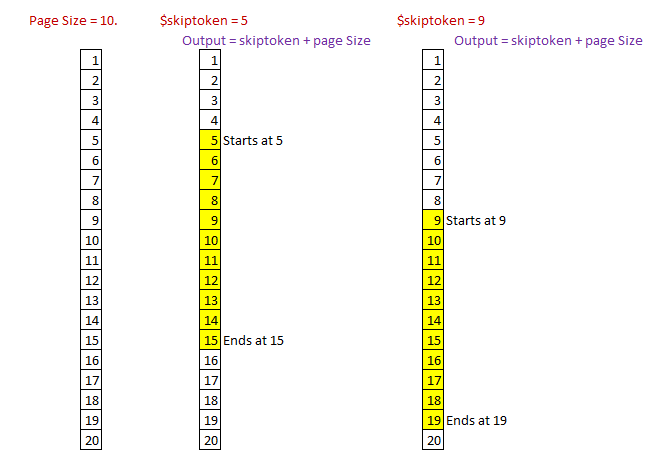
The process of server side paging using $skiptoken follows a clear flow.
First, the client requests data from an entity set. The server checks how many records exist and compares that number with a predefined page size. If the dataset exceeds the page size, only a portion of records is returned.
Along with the data, the server sends a next token value. This token indicates where the next page should begin. The client uses this token in the following request to retrieve the next set of results.
This cycle continues until all records are delivered.
When to Use $skiptoken
You should implement $skiptoken when your entity sets return large datasets, your application experiences slow loading due to heavy payloads, you need optimized backend performance, you are building scalable APIs, or you want the server to manage paging instead of adding complexity to the frontend.
It is especially useful in enterprise environments where thousands of users access large datasets simultaneously.
Technical Prerequisites
Before implementing $skiptoken, you should have a basic understanding of OData services, experience with the SAP Gateway Service Builder, knowledge of ABAP class extensions, and a working entity set that already returns data.
The implementation is typically done in the Data Provider Extension class inside the GET_ENTITYSET method.
Step by Step Implementation of $skiptoken
Let us assume you already have an OData service that retrieves product data.
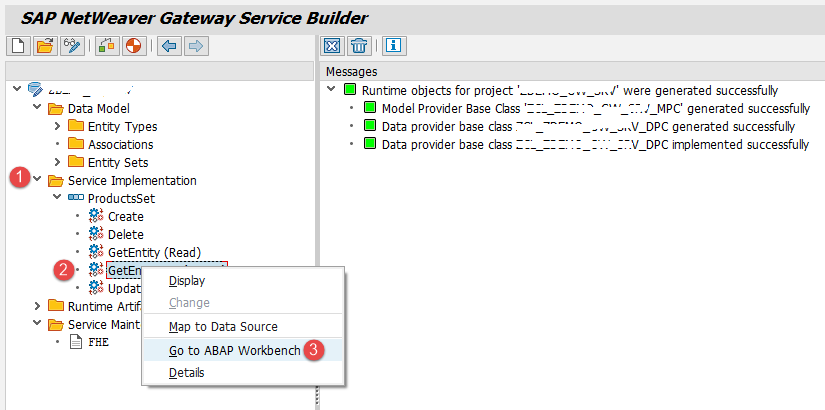
Step 1 Open the Service Project
Open the Service Builder and load your existing project. Navigate to the entity set for which paging is required. Move to the ABAP Workbench and open the Data Provider Extension class. Locate the method that retrieves the entity set data.
Step 2 Review Existing Data Retrieval Logic
Most basic implementations retrieve all records and directly send them to the response entity set. This approach works for small datasets but becomes inefficient when data volume increases.
The first improvement is to store all retrieved records in an internal table instead of sending them directly.
Step 3 Define Paging Variables
Create variables to control paging logic. Define a page size that limits how many records are sent per response. Create variables to store the starting index, ending index, skiptoken value, and total table size.
Step 4 Capture Skiptoken from the Request
Read the skiptoken value from the technical request context. If it is empty, it means the client is requesting the first page.
Step 5 Handle Empty Results
Check if the internal table contains records. If no records exist, clear the skiptoken in the response context and exit the method. This prevents unnecessary next links.
Step 6 Compare Table Size with Page Size
If the number of records is smaller than the defined page size, return all records. Paging is not required in this case.
If the number of records exceeds the page size, calculate the start and end index using the skiptoken value and page size.
Step 7 Slice the Data
Loop through the internal table and append only those records that fall within the calculated index range. This ensures that only a specific page of data is returned.
Step 8 Provide the Next Token
Set the next skiptoken value in the response context. This value helps the client fetch the next page. Format the token properly to avoid spacing or formatting issues.
Testing the Paging Logic
Once implementation is complete, test the service using the Gateway Client.
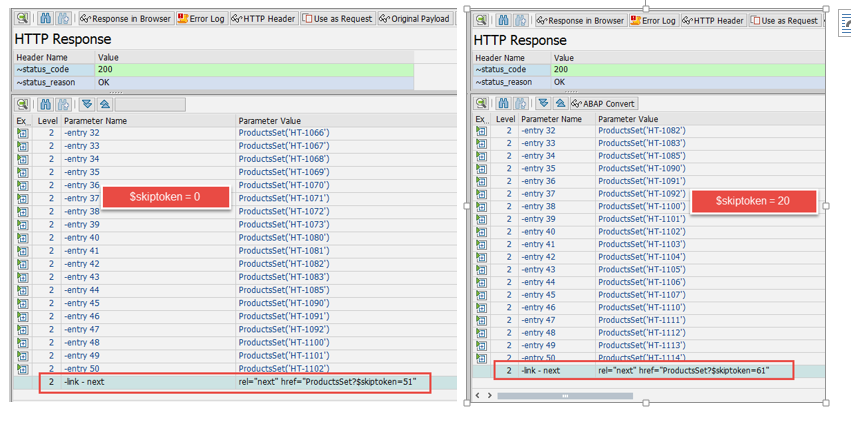
Execute the service without a skiptoken parameter. This should return the first page of results.
Next, execute the service again with a skiptoken value. This should return the next set of records.
Validate the number of records returned and confirm that the next token value changes correctly after each request.
Real World Scenario
Consider an inventory management system with 100,000 material records.
Without paging, loading the full dataset would consume high memory and delay application response. Users would struggle with slow screens and possible timeouts.
With $skiptoken paging enabled, the system loads only a small set of records at a time. Users experience faster navigation, smoother scrolling, and quicker searches. Backend systems remain stable even during peak usage.
Best Practices for Implementation
Always choose an optimal page size. Very small page sizes increase the number of server calls, while very large page sizes reduce performance benefits.
Maintain consistent sorting so records appear in the correct order across pages.
Handle edge cases when the dataset ends to avoid broken navigation.
Test performance with real production like data volumes.
Keep entity structures lightweight by excluding unnecessary fields.
Common Mistakes to Avoid
Do not forget to send the skiptoken in the response context. Without it, clients cannot request the next page.
Avoid inconsistent sorting, which may cause duplicate or missing records across pages.
Do not mix client side and server side paging logic. Choose one approach for clarity and performance.
Avoid skipping performance testing before deployment.
Performance Optimization Tips
Apply database filters to reduce the dataset before paging.
Use indexed fields to speed up data retrieval.
Avoid selecting unused columns from database tables.
Monitor service response times regularly.
Use buffering or caching for frequently accessed data.
Server Driven Paging vs Client Side Paging
Server driven paging provides better control, improved consistency, reduced frontend complexity, stronger security, and centralized performance management.
Client side paging may work for small datasets but becomes inefficient for enterprise scale systems.
Server controlled paging ensures predictable behavior across all devices and platforms.
Conclusion
The $skiptoken query option is essential for building high performance SAP OData services. It allows efficient handling of large datasets through server side paging, improving application speed and scalability.
By implementing paging logic in your backend service, you reduce system load, enhance user experience, and ensure your applications are ready for enterprise scale usage.
Mastering this technique is a valuable skill for SAP developers who want to build fast, reliable, and production ready OData services.
YOU MAY BE INTERESTED IN
ABAP Evolution: From Monolithic Masterpieces to Agile Architects
A to Z of OLE Excel in ABAP 7.4




 WhatsApp us