
Modern enterprise applications often require related data from multiple sources at the same time. For example, a sales application may need order header details along with line item information in a single screen. If separate service calls are made for each dataset, performance slows down and network traffic increases. SAP OData services solve this problem using the powerful $expand query option.
The $expand query option allows developers to retrieve related entities or entity sets in a single service call. This reduces round trips between client and server, improves performance, and simplifies application logic. In this tutorial, you will learn how $expand works, when to use it, and how to implement an optimized version in SAP Gateway.
Understanding the $expand Query Option
The $expand query option is used to fetch related entities together with the main entity in one request. Instead of making multiple OData calls, you can retrieve associated data using navigation properties.
This feature is especially useful when entity sets are connected through associations. If a relationship exists between entities such as sales orders and order items, $expand allows both datasets to be returned in a single response.
Why Use $expand in SAP OData
Enterprise applications demand high performance and fast data access. Using $expand offers several advantages.
It reduces the number of service calls
It improves performance and response time
It lowers network traffic
It simplifies frontend development
It provides structured and hierarchical data
This is extremely useful in SAP Fiori applications, analytics dashboards, reporting tools, and mobile apps.
System Requirements
The $expand query option is supported in systems running SAP NetWeaver Gateway 2.0 with Support Package level 03 or higher.
Syntax of $expand Query Option
Single Sales Order with Line Items
To retrieve a single sales order and its associated line items, use the navigation property in the query.
Example format
/sap/opu/odata/sap/SERVICE_NAME/SalesOrders(‘123’)?$expand=ToOrderItems
Multiple Sales Orders with Line Items
To retrieve multiple sales orders and their related items, use the entity set with $expand.
Example format
/sap/opu/odata/sap/SERVICE_NAME/SalesOrders?$expand=ToOrderItems
Here, ToOrderItems represents the navigation property name.
Prerequisites Before Using $expand
Before using $expand, ensure that your OData service includes multiple entity sets and proper associations between them. Associations define relationships between entities, and navigation properties enable movement across those relationships.
For example, a Sales Order entity must be associated with an Order Items entity so that related data can be fetched together.
Default Behavior of $expand in SAP Gateway
SAP Gateway provides a generic implementation of the $expand query option. This means you can use $expand directly without writing custom code.
When the service receives an $expand request, the framework processes it automatically.
First, it calls the GET_ENTITY or GET_ENTITYSET method to fetch the primary entity data.
Then, for each retrieved record, it calls the related entity set method in a loop.
Although this works functionally, it creates performance issues when large datasets are involved. Multiple backend calls increase processing time and system load.
Why Explicit Implementation is Needed
The standard framework handles expansion using repeated method calls. If many records are retrieved, the system repeatedly calls backend logic for each entry. This results in performance bottlenecks.
Explicit implementation allows developers to fetch related data in a single optimized call instead of multiple loops. This improves performance significantly.
Methods Used for Explicit $expand Implementation
To optimize performance, redefine the following methods in the Data Provider Extension class.
GET_EXPANDED_ENTITY
GET_EXPANDED_ENTITYSET
These methods allow custom logic to retrieve combined datasets efficiently.
Step by Step Implementation of $expand
Let us walk through the implementation process using a Sales Order and Order Items scenario.
Step 1 Open the DPC_EXT Class
After creating the OData service, open the Data Provider Extension class. Identify the method GET_EXPANDED_ENTITY and redefine it.
Step 2 Identify the Entity Set
Inside the method, capture the entity set name from the technical request context. This ensures that expansion logic runs only for the intended entity set.
Step 3 Read Key Parameters
Read key values such as Sales Order number from the key table. These keys help fetch the correct data from backend systems.
Step 4 Retrieve Data from Backend
Call appropriate backend function modules or BAPIs to retrieve both header and item data.
For example, a BAPI can return sales order header details and corresponding line items together.
Step 5 Prepare Response Structure
Move header data into the response structure.
Append line item data into the nested internal table.
Combine both datasets into a single response entity.
Step 6 Send Data Back to Framework
Use the framework method to copy the combined structure into the response reference. This ensures proper formatting of expanded data.
Step 7 Handle Other Cases
If the entity set does not match, call the superclass method to retain standard behavior. This avoids breaking other service operations.
Testing the $expand Implementation
Once coding is complete, test the service using the Gateway Client.
Execute the service with the $expand parameter included in the request.
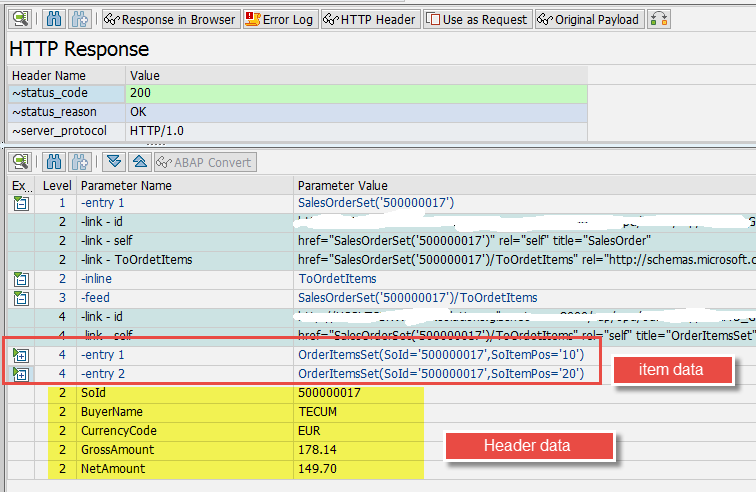
Verify that both header and item data are returned together in a single response.
Compare results with standard framework output to confirm accuracy.
Real World Example
Consider an order management application used by sales teams.
Without $expand
The app makes one call to fetch order headers
It makes another call to fetch order items
Multiple calls increase load time
With $expand
Both datasets load in a single call
Screens load faster
Users experience smoother navigation
This significantly improves user satisfaction and system efficiency.
Best Practices for Using $expand
Ensure associations are properly defined
Use meaningful navigation property names
Implement explicit expansion for performance critical services
Avoid deep expansions that fetch unnecessary nested data
Test with large datasets to evaluate performance impact
Common Mistakes to Avoid
Using $expand without associations
Fetching unnecessary related entities
Ignoring performance testing
Overloading services with deep nested expansions
Not redefining expansion methods when optimization is needed
Performance Optimization Tips
Retrieve only required fields
Combine backend calls where possible
Avoid redundant loops
Use efficient database queries
Monitor service response time regularly
When to Use Explicit vs Generic Expansion
Generic expansion is suitable for small datasets and simple applications.
Explicit expansion is recommended for large datasets, enterprise systems, and performance sensitive applications.
Choosing the right approach ensures optimal performance and scalability.
Conclusion
The $expand query option is a powerful feature that enhances SAP OData services by enabling retrieval of related data in a single call. While the default framework implementation works well for basic use cases, explicit implementation significantly improves performance for enterprise scenarios.
By mastering $expand, SAP developers can build faster, more efficient, and scalable applications that deliver a superior user experience.
YOU MAY BE INTERESTED IN
How to Convert JSON Data Structure to ABAP Structure without ABAP Code or SE11?
ABAP Evolution: From Monolithic Masterpie




 WhatsApp us