

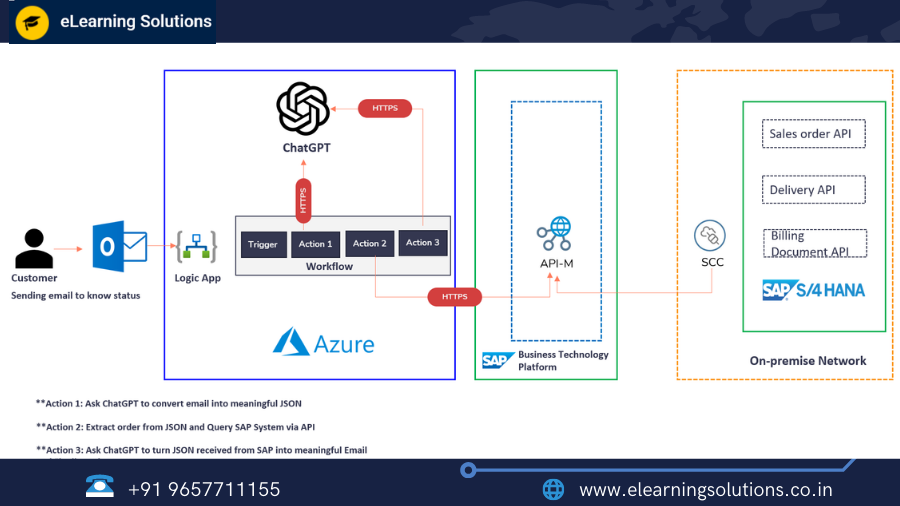
Introduction to ChatGPT Integration with SAP S/4HANA. In the digital era, it’s important to keep up with the latest technological advancements in order to stay competitive. With the rise of Artificial Intelligence (AI), chatbots have become an integral part of the customer service experience. Chatbots have been used in various industries to provide efficient customer service, from answering FAQs to resolving complex issues. SAP S/4HANA is a popular enterprise resource planning (ERP) system used by businesses around the globe. In this blog, we will discuss how ChatGPT, an AI-based chatbot, can be integrated with SAP S/4HANA to improve customer service.
Business usecase:
Chatbots can be used to automate customer support, saving businesses time and money. Chatbots can answer common customer queries, provide personalized recommendations, and even perform transactions. By integrating ChatGPT with SAP S/4HANA, businesses can provide a seamless customer experience, improve customer satisfaction, and increase revenue.
Technical Architecture:
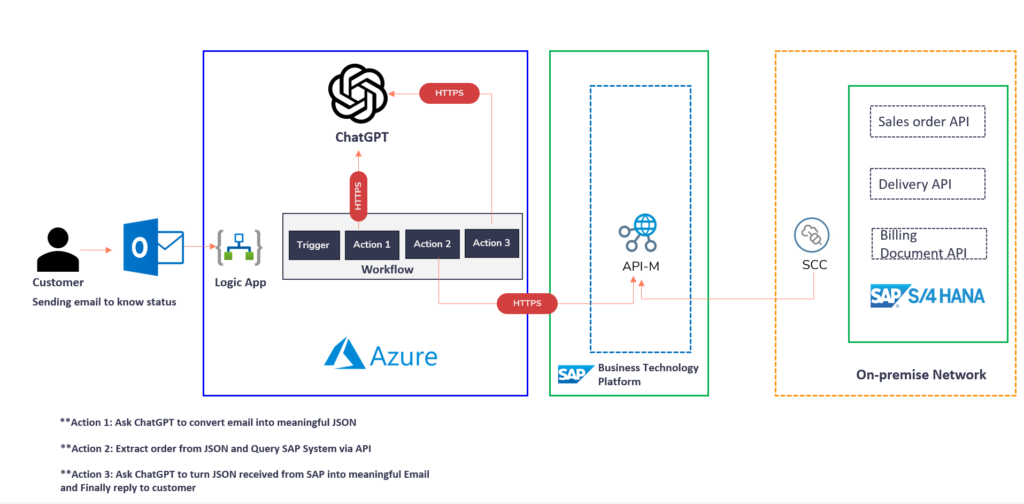
ChatGPT can be integrated with SAP S/4HANA using SAP Cloud Platform Integration (CPI). CPI is a cloud-based integration platform that connects SAP systems to external systems. CPI provides a secure and scalable integration solution that allows businesses to connect their SAP systems to other cloud-based applications.
Let’s start connecting the dots and kick off this project!
Step 1: Activate SAP Sales Order API in S/4HANA:
The first step is to activate the SAP Sales Order API in S/4HANA. This can be done by following these steps:
- Log in to SAP S/4HANA as an administrator
- Navigate to the transaction code “/IWFND/MAINT_SERVICE”
- Click on “Add Service” and enter the following details:
- Service Name: “ZSALESORDER_SRV”
- System Alias: “LOCAL”
- Technical Service Name: “ZSALESORDER_SRV”
- Description: “Sales Order API”
- Click on “Save”
Step 2: Test the odata service in Postman:
The next step is to test the OData service in Postman. OData is a RESTful API protocol used to expose SAP data. Postman is a popular API testing tool that allows users to test APIs easily. Follow these steps to test the OData service in Postman:
- Open Postman and create a new request
- Enter the OData service URL: “/sap/opu/odata/sap/ZSALESORDER_SRV/SalesOrderHeaderSet”
- Add the following headers:
- “Accept” : “application/json”
- “x-csrf-token” : “Fetch”
- Send the request and verify the response
Step 3: Install and configure SAP Cloud Connector:
The next step is to install and configure the SAP Cloud Connector. SAP Cloud Connector is a lightweight software component that provides a secure and reliable connection between SAP systems and external systems. Follow these steps to install and configure SAP Cloud Connector:
- Download the SAP Cloud Connector from the SAP website
- Install the SAP Cloud Connector on your local machine
- Configure the SAP Cloud Connector by adding a new system and specifying the details of the SAP S/4HANA system
Step 4: Consume S/4HANA OData API in SAP API Management
The next step is to consume the S/4HANA OData API in SAP API Management. SAP API Management is a cloud-based platform that allows businesses to manage and secure their APIs. Follow these steps to consume the S/4HANA OData API in SAP API Management:
- Login to SAP API Management.
- Click on the “APIs” tab in the top menu and select “API Providers”.
- Click on the “+ API Provider” button to add a new API provider.
- Enter a name for the API provider, such as “S/4HANA API”.
- Enter the endpoint URL for the S/4HANA OData API in the “Endpoint URL” field.
- Enter the authentication details for the S/4HANA OData API in the “Security” section.
- Click on the “Create” button to create the API provider.
- Once the API provider is created, click on the “APIs” tab in the top menu and select “API Proxies”.
- Click on the “+ API Proxy” button to add a new API proxy.
- Enter a name for the API proxy, such as “S/4HANA API Proxy”.
- Select the API provider that you created in step 4 from the “API Provider” drop-down list.
- Click on the “Next” button to proceed.
- Configure the API proxy settings, such as the request/response headers and URL paths.
- Click on the “Create” button to create the API proxy.
- Once the API proxy is created, you can test it using the built-in testing tools in SAP API Management.
Step 5: Test ChatGPT to generate JSON from customer query:
The next step is to test ChatGPT to generate JSON from a customer query. ChatGPT is an AI-based chatbot that can generate responses based on natural language processing. Follow these steps to test ChatGPT:
- Create a new bot in ChatGPT
- Train the bot with sample questions and responses related to SAP S/4HANA
- Test the bot by sending a sample question and verifying the JSON response
Step 6: Test ChatGPT to generate meaningful email from SAP API Response:
The next step is to test ChatGPT to generate a meaningful email from the SAP API response. ChatGPT can generate responses in various formats, including text, JSON, and email. Follow these steps to test ChatGPT to generate an email:
- Create a new bot in ChatGPT
- Train the bot with sample questions and responses related to SAP S/4HANA
- Configure the bot to generate an email response based on the SAP API response
- Test the bot by sending a sample question and verifying the email response
Step 7: Get an API Key and Try out the ChatGPT Latest Model turbo via Postman:
The next step is to get an API key and try out the ChatGPT latest model turbo via Postman. ChatGPT offers various models that can be used for different use cases. Follow these steps to get an API key and try out the latest model turbo via Postman:
- Sign up for ChatGPT and get an API key
- Download the ChatGPT Postman collection
- Test the ChatGPT latest model turbo by sending a sample question and verifying the response
Step 8: Build an Integration flow using Microsoft Azure Logic App:
The final step is to build an integration flow using Microsoft Azure Logic App. Azure Logic App is a cloud-based integration platform that allows businesses to automate workflows and integrate systems. Follow these steps to build an integration flow:
- Create a new Logic App in Azure
- Configure the Logic App to trigger when a new message is received in ChatGPT
- Configure the Logic App to call the SAP API and retrieve the required data
- Configure the Logic App to send a response to the customer
What is CPI(BTP-IS)?
SAP Cloud Platform Integration (CPI), previously known as SAP Cloud Platform Integration for data services, is a cloud-based integration platform that allows businesses to connect SAP systems to external systems. CPI provides a secure and scalable integration solution that allows businesses to connect their SAP systems to other cloud-based applications.
How ChatGPT can be integrated?
ChatGPT can be integrated with SAP S/4HANA using SAP Cloud Platform Integration (CPI). CPI provides a secure and scalable integration solution that allows businesses to connect their SAP systems to other cloud-based applications. ChatGPT can be used to automate customer support, providing a seamless customer experience, improving customer satisfaction, and increasing revenue.
How CPI integrates with ChatGPT?
CPI integrates with ChatGPT by providing a secure and scalable integration solution that allows businesses to connect their SAP systems to other cloud-based applications. CPI can be used to trigger workflows when new messages are received in ChatGPT, call SAP APIs to retrieve data, and send responses to customers.
Prerequisites:
Before integrating ChatGPT with SAP S/4HANA, businesses must have the following prerequisites:
- Access to SAP S/4HANA as an administrator
- Knowledge of RESTful APIs and OData services
- Access to SAP Cloud Platform Integration (CPI)
- Access to ChatGPT and an API key
Usage:
ChatGPT integration with SAP S/4HANA can be used in various business use cases, including:
- Customer support automation: ChatGPT can be used to automate customer support, providing a seamless customer experience, improving customer satisfaction, and increasing revenue. ChatGPT can generate responses based on natural language processing, providing a human-like interaction with customers.
- Sales order automation: ChatGPT can be used to automate the sales order process, generating sales orders based on customer requests. ChatGPT can generate responses in various formats, including text, JSON, and email, providing a flexible solution for businesses.
- Inventory management automation: ChatGPT can be used to automate inventory management, providing real-time inventory data and alerts based on inventory levels. ChatGPT can generate responses based on SAP API responses, providing accurate and timely inventory data.
Examples:
Let’s take an example of how ChatGPT integration with SAP S/4HANA can be used for customer support automation:
- A customer sends a message to ChatGPT requesting information about their order status.
- ChatGPT triggers a workflow in CPI, calling the SAP API to retrieve the order status.
- CPI retrieves the order status from SAP S/4HANA and sends the response back to ChatGPT.
- ChatGPT generates a response based on the SAP API response, providing the customer with the order status.
- The customer is satisfied with the response and their issue is resolved without the need for human intervention.
In conclusion, ChatGPT integration with SAP S/4HANA provides a powerful solution for businesses looking to automate customer support, sales order processing, and inventory management. By leveraging the power of AI-based chatbots and cloud-based integration platforms, businesses can provide a seamless customer experience, improve customer satisfaction, and increase revenue.
We at eLearning solutions provide SAP courses online & offline.To get course details you can click here.
From SAP implementation to SAP migration, get everything that you need in one place. If you want to know how we can add value to your business, get in touch with our experts today!
Interested in these SAP Classes? Fill Your Details Here
Error: Contact form not found.


 WhatsApp us