


Creating a free Salesforce Developer Organization
Developers can use the Salesforce platform to create, test, and implement apps by utilizing the Salesforce Developer Organization platform. It offers an entire toolkit for creating, modifying, and testing applications in a sandbox setting.
Introduction
Are you ready to take your first step into the world of Salesforce development? If you’re a student, job seeker, or employee, a free Salesforce Developer Organization (Dev Org) is a great way to boost your skills. This blog will cover the basics. It will explain why a Dev Org is important. You’ll also receive practical tips to help you begin without difficulties.
What is a Salesforce Developer Organization?
A Salesforce Developer Organization (Dev Org) is a free, complete Salesforce space. It lets developers explore, build, and test applications. A Dev Org is different from a sandbox. A sandbox mimics a production environment, while a Dev Org is a new instance meant for learning and development.
Take a look at Salesforce Flow Bootcamp further.
You can do the following to set up a Salesforce developer organization:
- Go to https://developer.salesforce.com/signup to access the Salesforce Developer website.
- Select the “Sign Up” option.
- Provide your details, such as your name, email address, and password, on the registration form.
- To accept the terms and conditions, check this box.
- Select the “Sign me up” option.
- Salesforce will send you an email with an activation link for your account. In order to activate your account, click the link.
- After activating your account, the Salesforce Developer Dashboard will be displayed to you.
- The “New Salesforce Org” button should be clicked.
- To create a new developer organization, complete the form, making sure to include the org name, type, and edition.
- Select “Create Org” from the menu.
Check this out—the Complete Salesforce Flow Bootcamp
Salesforce offers five distinct kinds of organizations for the Developer edition.
- Version essential
- Expert version
- Version Enterprise
- No limitless version
- Version for developers
It is noteworthy that only the Salesforce Developer Edition org is publicly available out of all of these. You may always contact the Salesforce executives to update your Salesforce org edition.
By doing the following, you can see if your organization is now in print:
Configure the company details by selecting the “Organization edition” option.
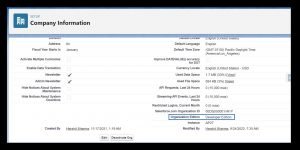
Many congratulations!You have successfully built a Salesforce developer org. Now is the time to start working on your organization and improving your Salesforce abilities.
Get the whole Salesforce Admin and Development Roadmap.
How to Create a Free Salesforce Developer Organization: A Step-by-Step Guide
Salesforce, a leading customer relationship management (CRM) platform, offers a powerful suite of tools designed to streamline business operations, enhance customer interactions, and drive growth. For developers, Salesforce provides a robust environment to build, test, and deploy applications through its Developer Edition. In this guide, we’ll walk you through the process of creating a free Salesforce Developer Organization, equipping you with the knowledge to leverage this platform’s full potential.
Understanding the Salesforce Developer Organization
A Salesforce Developer Organization (Dev Org) is a free, fully featured version of Salesforce that allows developers to explore and experiment with the platform’s extensive capabilities. It’s an invaluable resource for learning Salesforce development, testing new ideas, and gaining hands-on experience without the constraints of a paid subscription.
Step-by-Step Guide to Creating a Free Salesforce Developer Organization
1. Visit the Salesforce Developer Website
Begin by navigating to the Salesforce Developer website. You can find it by searching for “Salesforce Developer” or directly visiting . This site is dedicated to developers and provides a wealth of resources, including documentation, forums, and tools.
2. Sign Up for a Developer Account
On the Salesforce Developer website, look for the “Sign Up” button or a similar call to action. Click on it to start the registration process. You will be prompted to provide some basic information, including your name, email address, company name, and job role. Ensure that you use a valid email address, as Salesforce will send you a confirmation link.
3. Complete the Registration Form
Fill out the registration form with accurate details. This typically includes:
- Name: Your full name as you would like it to appear on your account.
- Email Address: A working email address where Salesforce can reach you. This will be used for account notifications and verification.
- Company: You can enter “Developer” or a fictitious name if you are not currently affiliated with a company.
- Country: Select your country from the dropdown menu.
- Job Role: Choose an appropriate role such as “Developer” or “Administrator.”
4. Agree to the Terms and Conditions
Read through Salesforce’s terms and conditions and privacy policy. It’s important to understand the terms of service and how Salesforce will use your data. Once you’ve reviewed them, check the box to agree to these terms.
5. Verify Your Email Address
After submitting the registration form, Salesforce will send a verification email to the address you provided. Go to your inbox, open the email, and click the verification link. This step is crucial as it confirms your email address and activates your Salesforce Developer Organization.
6. Log In to Your Developer Org
Once your email address is verified, return to the Salesforce Developer website and log in using your credentials. You’ll be redirected to your new Developer Organization where you can start exploring the platform.
7. Set Up Your Developer Org
Upon logging in, you may be prompted to complete an initial setup. This can include configuring your user profile, setting up security features, and familiarizing yourself with the Salesforce interface. Salesforce provides a series of guided tours and tutorials to help you get started.
8. Explore and Experiment
With your Developer Organization up and running, you have access to a wide range of Salesforce features and tools. Utilize the robust suite of development tools, including Apex, Visualforce, and Lightning Web Components, to build and test your applications. Take advantage of the extensive documentation and community forums available to assist you throughout your development journey.
Conclusion
Creating a Salesforce Developer Organization is a straightforward process that opens up a world of opportunities for developers. By following these steps, you gain access to a powerful, free platform that enables you to develop, test, and refine your Salesforce skills. As you embark on your Salesforce development journey, remember to explore the vast resources available and actively participate in the Salesforce community to enhance your learning and professional growth.
you may be interested in this blog here
Advanced Integration Scenarios with SAP PO
Sap mm real-time issues and solutions
What is the salary of a fresher Oracle consultant?
Error: Contact form not found.


 WhatsApp us