


OData (Open Data Protocol) is a powerful web protocol that enables the creation and consumption of RESTful APIs. It provides a standardized way to interact with data, including performing queries and CRUD (Create, Read, Update, Delete) operations. In this blog, we will guide you through the process of performing OData queries and CRUD operations, empowering you to harness the full potential of OData.
Performing OData Queries
Basic Querying: OData allows you to retrieve data using HTTP GET requests. You can specify the entity set and use query options to filter, sort, and paginate the results. For example, to retrieve a specific entity, you can use the following URL: https://api.example.com/odata/Products(123). To filter the results, you can use the $filter option, such as https://api.example.com/odata/Products?$filter=Category eq ‘Electronics’. Additional options like $orderby for sorting and $top and $skip for pagination provide further flexibility.
Expanding Navigation Properties: OData supports navigation properties that allow you to retrieve related data in a single request. By using the $expand option, you can fetch related entities along with the main entity. For example, https://api.example.com/odata/Orders?$expand=Customer retrieves all orders along with the customer information for each order.
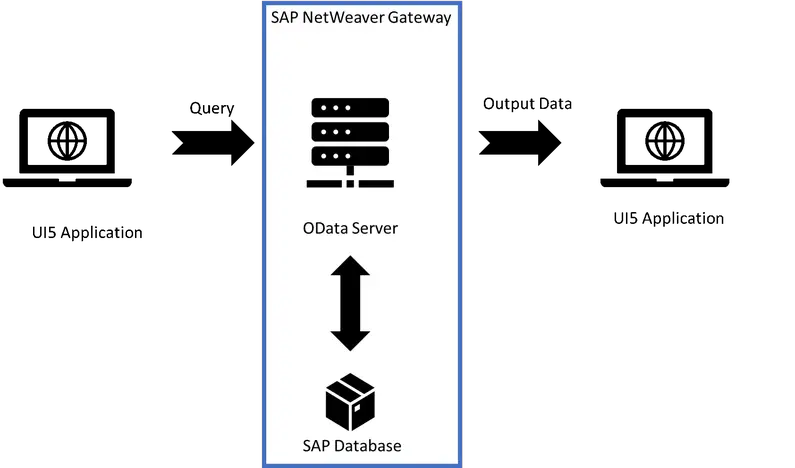
Aggregation and Grouping: OData provides options for performing aggregations and grouping operations on data. You can use the $apply option with functions like aggregate or groupby to compute aggregated values or group data based on specific properties. For instance, https://api.example.com/odata/Sales?$apply=groupby((Category), aggregate(Amount with sum as TotalAmount)) groups sales data by category and computes the total amount for each category.
Performing CRUD Operations
Creating Entities: To create a new entity using OData, you can send an HTTP POST request to the entity set URL. The request payload should contain the data for the new entity in the specified format (XML or JSON). For example, POST to https://api.example.com/odata/Products with the payload containing the necessary properties creates a new product entity.
Updating Entities: OData supports updating existing entities using HTTP PUT or PATCH requests. With PUT, you send the complete updated entity data in the request payload. PATCH, on the other hand, allows you to send only the properties that need to be updated. Use the appropriate HTTP method (PUT or PATCH) along with the entity URL to update the entity.
Deleting Entities: OData enables entity deletion through an HTTP DELETE request to the entity URL. For example, DELETE to https://api.example.com/odata/Products(123) deletes the product entity with the specified ID.
Conclusion
Performing queries and CRUD operations using OData empowers developers to interact with data in a standardized and efficient manner. With OData’s query options, you can retrieve, filter, sort, and paginate data with ease. Additionally, OData’s support for CRUD operations enables the creation, updating, and deletion of entities in a seamless and consistent manner.
By mastering OData’s querying and CRUD capabilities, you can unlock the power of RESTful APIs and integrate your applications with various data sources. Embrace the flexibility and standardization provided by OData to build robust and efficient solutions that enhance data-driven decision-making and streamline business processes.
Interested in these SAP Classes? Fill Your Details Here
Error: Contact form not found.


 WhatsApp us