

In enterprise business applications, data is rarely stored in isolation. Most transactional processes follow a header and item structure where a single business document contains general information at the header level and detailed line entries at the item level. Sales Orders, Purchase Orders, Deliveries, and Invoices all follow this design. When building services in SAP OData, understanding how to retrieve both header and item data and link them properly is essential for creating powerful and user friendly applications. This guide explains how to create item entities, fetch item data, and associate header and item entities in an SAP OData service using SAP NetWeaver Gateway.
Understanding Header and Item Structure
In SAP systems, header data represents overall document information such as document number, date, customer, company code, and total value. Item data represents line level details such as material number, quantity, price, and plant. A single header can contain multiple items, forming a one to many relationship.
For example, a Sales Order header contains buyer and order date, while its items include individual products and quantities. When exposing such data through OData services, both header and item entities must be modeled and linked so applications can retrieve structured business data efficiently.
Why Header and Item Modeling Matters in OData
Modern SAP applications, especially SAP Fiori apps, rely heavily on hierarchical data. Users typically open a document list, select a record, and view detailed line items. Without proper header item association, services become inefficient and fragmented.
Correct modeling ensures
Better performance with structured queries
Clear navigation between related entities
Cleaner frontend development
Accurate business logic representation
Seamless integration with enterprise applications
Prerequisites Before Implementation
Before proceeding, ensure the following are ready
An existing OData project created in Service Builder
Sales Order header entity already implemented
Backend tables or structures available
Runtime objects generated
Authorization and system connectivity verified
Step 1 Create Entity Type for Item Data
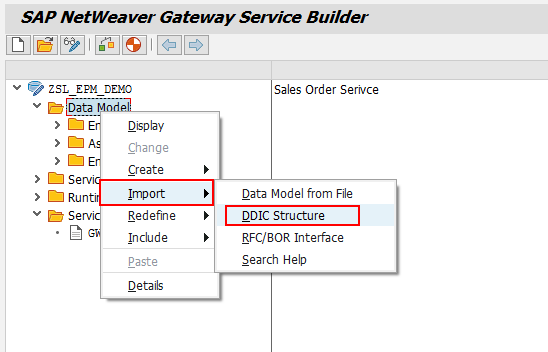
Open transaction SEGW and load your existing OData project.
Navigate to Data Model.
Right click and choose Import then DDIC Structure.
This option allows you to create an entity using an ABAP structure from the Data Dictionary.
Step 2 Provide Entity and Structure Details
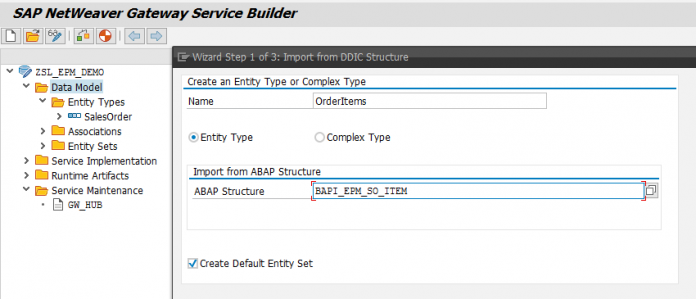
Enter the following details
Entity Type Name for Sales Order Item
ABAP Structure Name containing item fields
Choose Next to proceed.
This step maps backend structure fields into the OData model.
Step 3 Select Required Fields
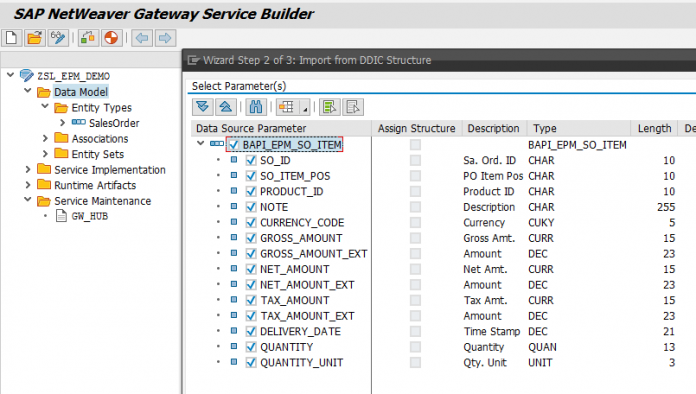
Choose relevant fields from the structure.
Avoid unnecessary fields to keep the service lightweight and efficient.
Click Next after selection.
Field selection directly affects service performance and response size.
Step 4 Define Key Fields
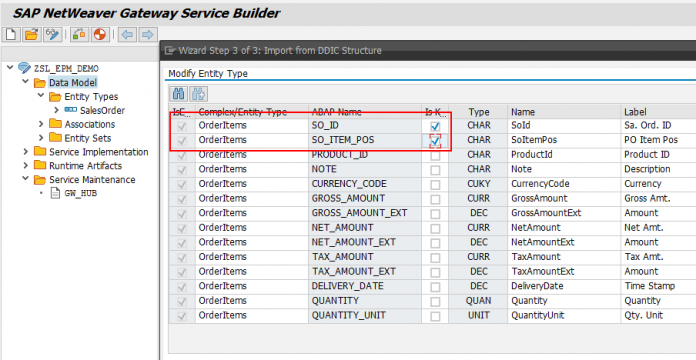
Select Sales Order Number and Sales Order Item Number as key fields.
Keys uniquely identify each item record within a document.
Click Finish to complete entity creation.
Correct key configuration is critical for navigation and filtering.
Step 5 Regenerate the Service
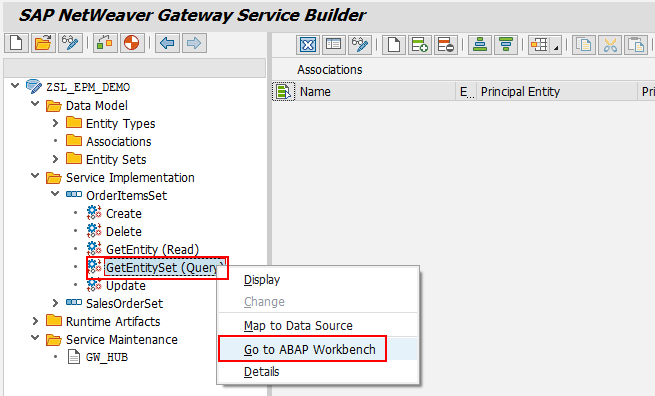
After creating the entity type, regenerate runtime objects.
This step updates the Model Provider and Data Provider classes with new definitions.
You will now see a new Entity Set created for item data.
Step 6 Implement Entity Set Method
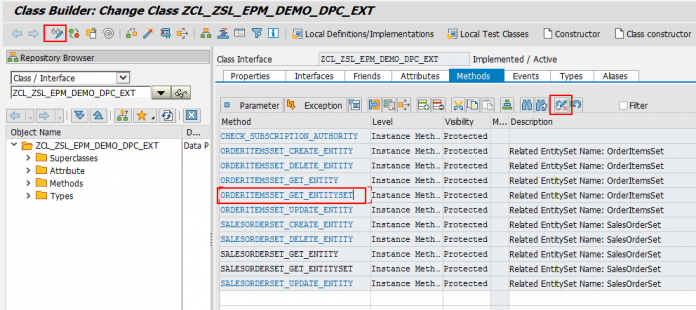
Navigate to Service Implementation.
Expand the newly created Item Entity Set.
Right click on GetEntitySet also called Query operation.
Select Go to ABAP Workbench.
This opens the Data Provider Extension class where backend logic is written.
Step 7 Redefine the Method
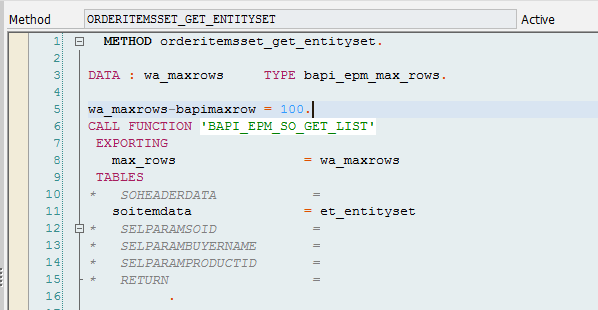
Switch to change mode.
Locate the method handling item entity retrieval.
Click Redefine to implement custom logic.
Redefinition allows replacing generated code with business logic.
Step 8 Write ABAP Code to Fetch Item Data
Implement logic to retrieve item data from backend tables.
Typically, developers fetch limited records for testing and performance control.
Example approach
Select item records from database table
Map fields into response structure
Append records into entity set table
Limit rows for optimized performance
This ensures controlled data retrieval during development.
Step 9 Activate the Objects
Save and activate the method.
Activate the Data Provider Extension class.
Inactive objects prevent service execution.
Always confirm activation before testing.
Step 10 Test the Service
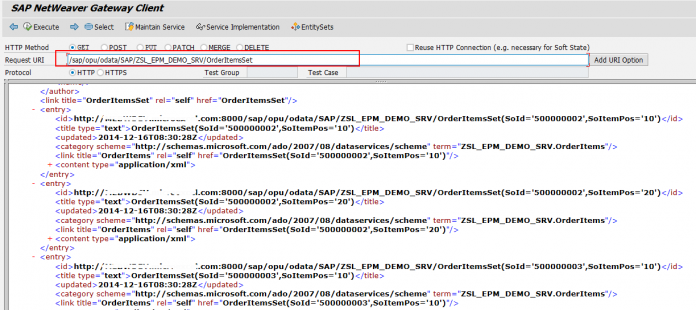
Open Gateway Client using transaction code /IWFND/GW_CLIENT.
Enter the service URL with the item Entity Set name.
Execute the service.
The system returns item data in XML or JSON format depending on request headers.
Successful output confirms correct implementation.
Retrieving Header and Item Data Together
So far, header and item data are retrieved separately. However, business applications require linked navigation where selecting a header automatically loads related items.
To achieve this, OData services use two powerful concepts
Association
Navigation
Understanding Association
Association defines the relationship between two entity types. In a Sales Order scenario, one header can have many items. This is defined as a one to many association.
Association requires
Principal entity type
Dependent entity type
Mapping key fields
Cardinality definition
Proper association ensures data integrity across entities.
Understanding Navigation
Navigation allows moving from one entity to related entities through service URLs.
For example
From Sales Order Header to its Items
From Customer to Orders
From Order to Deliveries
Navigation makes services intuitive and application friendly.
Example Navigation Scenario
A user selects a Sales Order.
The system automatically fetches associated line items.
This happens using navigation properties defined in the service model.
Frontend applications use navigation URLs to retrieve related data seamlessly.
Real World Use Cases
Sales order processing systems
Procurement workflows
Inventory movement tracking
Billing document analysis
Mobile approval applications
Analytics drilldown reporting
Each scenario relies on header item relationships.
Performance Best Practices
Select only required fields
Use indexed key fields
Limit row counts during testing
Avoid nested database queries
Use buffering for frequently accessed data
Proper optimization ensures fast and scalable services.
Common Issues and Fixes
Missing key fields cause navigation failures
Incorrect associations return empty results
Inactive runtime objects block execution
Field mismatches create mapping errors
Authorization gaps restrict data access
Careful validation resolves most issues quickly.
Integration with Enterprise Applications
Applications built on platforms from SAP rely on structured OData services to display hierarchical business data. Proper header and item modeling enables seamless integration with modern user interfaces, dashboards, and workflow systems.
Final Thoughts
Header and item data modeling is a foundational concept in SAP OData development. By creating item entities, implementing retrieval logic, and defining associations, developers enable powerful business applications that mirror real world document structures. Mastering these concepts improves backend design, enhances frontend experience, and ensures scalable enterprise solutions.
you may be interested in this blog here:-
Don’t Fear the Update: Navigating the Challenges of how to implement sap note
Five Top Technology Investment Drivers for 2024
How many dollars worth of RSU does Salesforce typically offer an MTS (experienced hire) on joining?
Integration cloud system to HANA Cloud Platform using Cloud Connector


 WhatsApp us