
SAP systems generate massive volumes of business data every second, and modern enterprises need seamless ways to expose that data securely to web, mobile, and cloud applications. This is where OData services in SAP NetWeaver Gateway become essential. After modeling an OData service, the next crucial step is implementing the service by writing the business logic that retrieves and processes data from the backend ERP system. Proper implementation ensures performance, accuracy, and scalability for real world enterprise applications. In this guide, you will learn step by step how to implement an OData service in SAP NetWeaver Gateway using ABAP, along with practical examples and expert tips.
Understanding OData Service Implementation in SAP
OData service implementation is the process of writing backend logic that connects SAP business data with external applications. Once the data model and service structure are created in the Gateway Service Builder, implementation methods are used to handle Create, Read, Update, Delete, and Query operations. These operations are commonly known as CRUDQ methods. Each entity set in your service contains dedicated methods that define how data is processed and delivered.
CRUDQ Methods in Gateway Service Builder
Inside the Service Implementation node, SAP provides five essential methods for every entity set. Create handles inserting new records into the backend system. Delete removes records from the backend. GetEntity reads a single record based on key fields. GetEntitySet retrieves a collection of records. Update modifies existing backend records. These methods allow your SAP system to communicate with applications like Fiori apps, mobile apps, analytics tools, and third party platforms.
For example, in a Sales Order service, GetEntitySet is used to fetch a list of sales orders, while GetEntity retrieves details of a single sales order. Each method contains ABAP code that interacts with BAPIs, function modules, CDS views, or database tables.
Step by Step Guide to Implement OData Service
Step 1 Open Gateway Service Builder
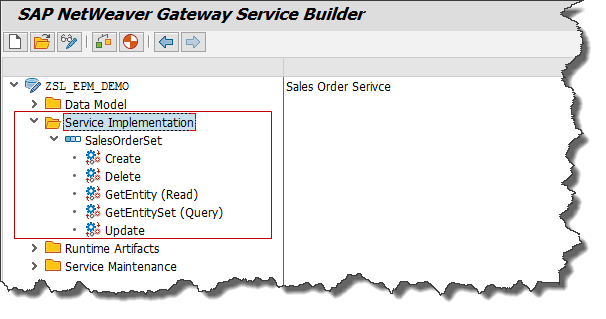
Execute transaction SEGW in SAP GUI. This opens the Gateway Service Builder where your project is stored. Expand your project and navigate to the Service Implementation node. Here you will see entity sets and their related methods.
Step 2 Locate Required Entity Set Methods
Under the Service Implementation node, select the entity set you want to implement. SAP automatically generates method stubs for Create, Delete, GetEntity, GetEntitySet, and Update. These methods are empty until you write the business logic.
Step 3 Choose the Query Method
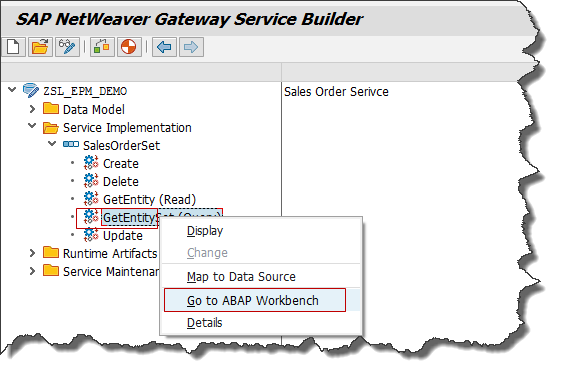
To fetch a list of records from SAP, right click on GetEntitySet and select Go to ABAP Workbench. This method handles data retrieval requests when users request multiple records.
Step 4 Ignore the Popup
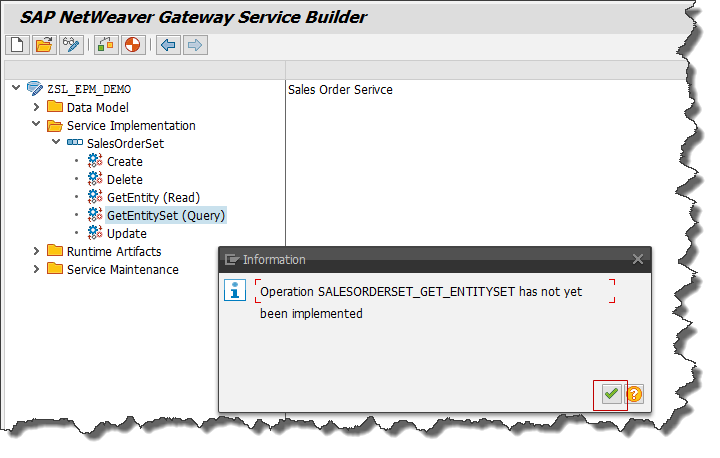
When redirected to the ABAP Workbench, a popup may appear. Click Continue since we are implementing custom logic.
Step 5 Access the DPC Extension Class
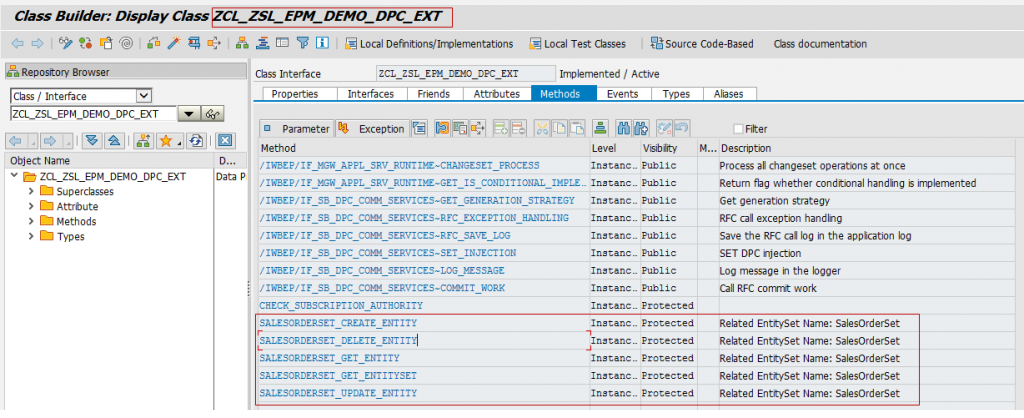
You will be navigated to the Data Provider Class extension, commonly called the DPC_EXT class. This class is used for custom coding so that standard SAP classes remain unchanged. Find the method named based on your entity set. For example SALESORDERSET_GET_ENTITYSET.
Step 6 Redefine the Method
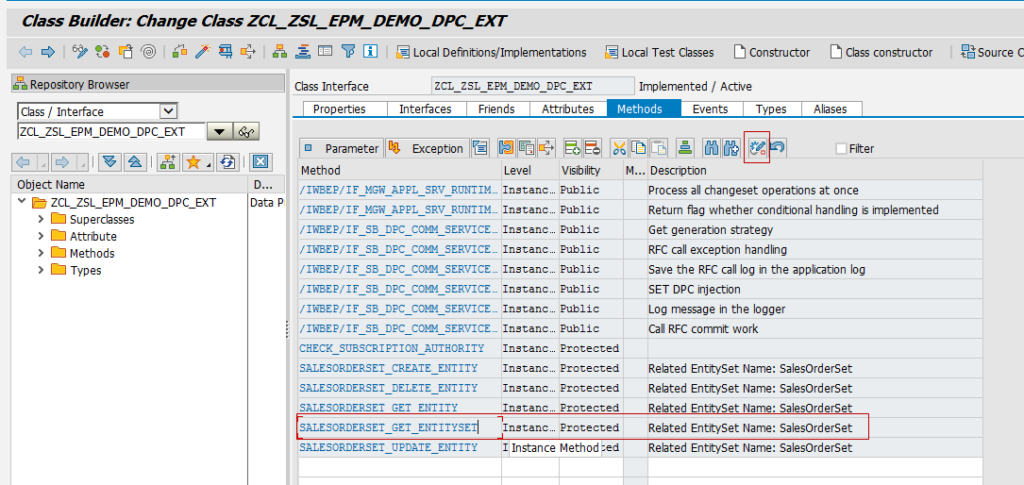
Select the method and click the Redefine button. Redefinition allows you to add custom ABAP logic while preserving the original SAP framework. You may see commented template code which can be ignored.
Step 7 Write ABAP Code to Fetch Backend Data
Now you can write ABAP logic to fetch data from SAP. The example below retrieves Sales Orders using a standard BAPI.
DATA ls_max_rows TYPE bapi_epm_max_rows.
DATA lt_salesorder TYPE TABLE OF bapi_epm_so_header.
DATA ls_salesorder TYPE bapi_epm_so_header.
DATA ls_entityset TYPE zcl_zdemo_gw_srv_mpc=>ts_salesorder.
ls_max_rows-bapimaxrow = 20.
CALL FUNCTION ‘BAPI_EPM_SO_GET_LIST’
EXPORTING
max_rows = ls_max_rows
TABLES
soheaderdata = lt_salesorder.
IF lt_salesorder IS NOT INITIAL.
LOOP AT lt_salesorder INTO ls_salesorder.
MOVE-CORRESPONDING ls_salesorder TO ls_entityset.
APPEND ls_entityset TO et_entityset.
ENDLOOP.
ENDIF.
This code calls a BAPI to fetch Sales Order data, maps backend fields to the OData structure, and sends results to the response entity set.
Step 8 Activate and Save
Save and activate the method. Then activate the DPC_EXT class. Activation ensures your service logic is available at runtime.
Step 9 Return to Service Builder
Navigate back to SEGW. Your OData service implementation is now complete. The next step is registering and testing the service in SAP Gateway.
Practical Example Explained
Let us understand what happens behind the scenes. When a Fiori app requests Sales Orders, the Gateway framework triggers the GetEntitySet method. Your ABAP code calls the BAPI to retrieve records from SAP ERP. Data is converted into OData format and returned as a JSON or XML response. This allows modern applications to consume SAP data securely over HTTP.
Tips for Writing Efficient OData Logic
Use Standard BAPIs and CDS Views
Standard SAP BAPIs ensure stability and upgrade safety. CDS Views provide high performance data retrieval with advanced filtering and aggregation.
Avoid Heavy Loops
Process large datasets carefully. Use internal table operations and database level filtering instead of nested loops.
Implement Pagination
Always limit records returned using max rows or server side paging. This improves performance and prevents memory overload.
Use Field Mapping Carefully
MOVE CORRESPONDING works well when field names match. For custom fields, assign values explicitly to avoid data mismatch.
Handle Exceptions Properly
Use exception classes and meaningful error messages so consuming applications understand failures clearly.
Test with Gateway Client
Use transaction /IWFND/GW_CLIENT to test your service before exposing it to applications. This helps validate responses and debug issues.
Common Mistakes to Avoid
Many developers forget to redefine methods, causing code to be ignored. Others fetch entire tables without filters, creating performance issues. Incorrect field mapping leads to empty responses. Skipping activation prevents services from running. Ignoring error handling results in unclear API failures.
Real World Use Cases
OData services are widely used in SAP Fiori applications, mobile workforce solutions, customer portals, supplier integrations, and analytics dashboards. Businesses rely on OData for real time order tracking, financial reporting, inventory monitoring, and workflow automation.
Why OData Implementation Matters
A well implemented OData service ensures secure data exchange, faster application performance, and seamless integration across platforms. It transforms SAP from a closed system into an intelligent digital core that connects with modern technologies.
Final Thoughts
Implementing OData services in SAP NetWeaver Gateway is a must have skill for SAP ABAP and integration professionals. Once you understand CRUDQ methods and backend logic design, you can build powerful APIs that serve enterprise applications efficiently. With proper implementation practices, performance optimization, and testing, your SAP services will be reliable, scalable, and future ready.
YOU MAY BE INTERESTED IN
ABAP Evolution: From Monolithic Masterpieces to Agile Architects
A to Z of OLE Excel in ABAP 7.4




 WhatsApp us