

In SAP OData services, Association and Navigation are critical concepts that allow developers to link related entity types and enable efficient data retrieval. These concepts are particularly useful when dealing with header and item data structures, such as Sales Orders, where one header can contain multiple line items. Understanding how to implement associations and navigation properties ensures that applications can fetch related data seamlessly and deliver a user friendly experience. This tutorial explains step by step how to configure Association and Navigation in SAP OData using practical examples and ABAP implementation.
Understanding Association and Navigation
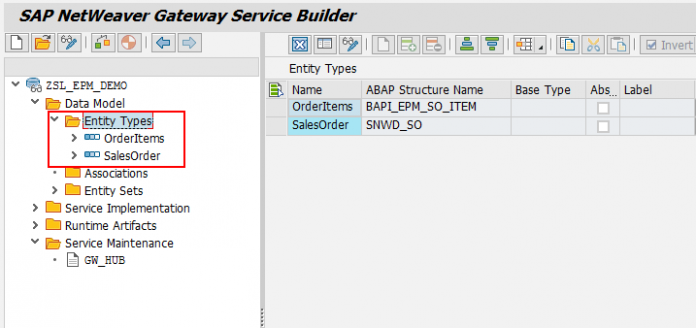
Association defines the relationship between two entity types. Navigation provides the path to traverse from one entity to another based on that association. For example, a Sales Order header entity can be associated with multiple Sales Order item entities. By creating an association, you establish a link, and navigation allows retrieving items for a specific sales order through a simple URI.
In earlier tutorials, we created separate entity sets for Sales Order header (SalesOrderSet) and items (OrderItemsSet). Without association, these entity sets are independent and cannot be queried together. Using Association and Navigation resolves this limitation.
Step 1: Open Service Builder
Launch transaction SEGW and open your existing OData project.
Expand the service node to access the Data Model.
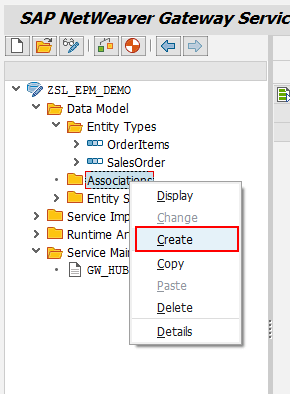
Navigate to Associations and click to create a new association.
Associations form the backbone of navigation properties, linking principal and dependent entities.
Step 2: Define Association Details
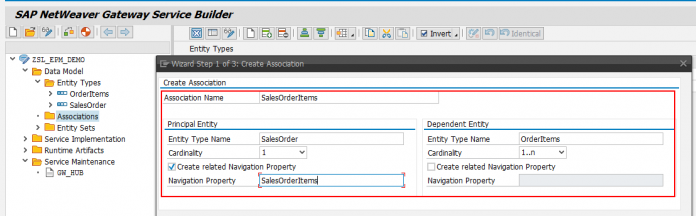
Provide the following information:
Principal Entity: The main entity from which data navigation starts, e.g., SalesOrderSet.
Dependent Entity: The entity to be accessed through the association, e.g., OrderItemsSet.
Cardinality: Defines the relationship, such as one to many (1..n).
Navigation Property: Name of the property that will appear in the service URI to navigate from principal to dependent entity.
Click Next to continue.
Step 3: Map Key Fields
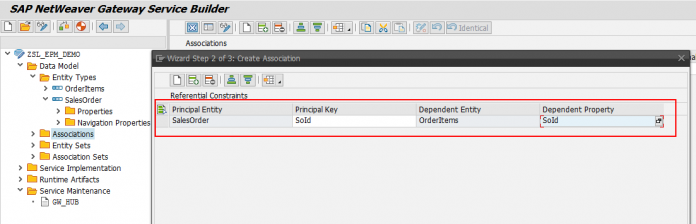
Identify common fields between the principal and dependent entities. In a Sales Order scenario, SalesOrderId is the shared field.
Map the key fields correctly to ensure that navigation retrieves only relevant dependent records.
Click Next to proceed.
Step 4: Complete Association Setup
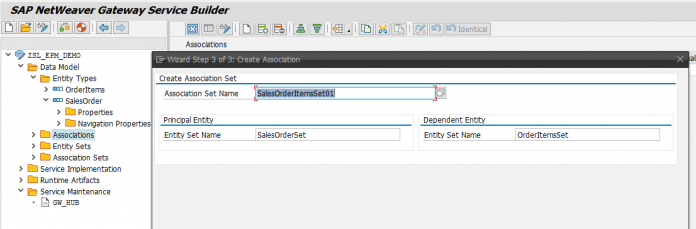
Review the entries and click Finish.
This creates the navigation property in the principal entity and the association in the service metadata.
Regenerate the service to update runtime objects. The service metadata now reflects the newly added association and navigation property.
Step 5: Understand Service Navigation
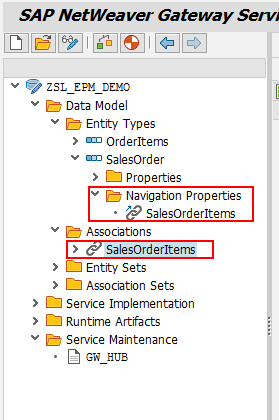
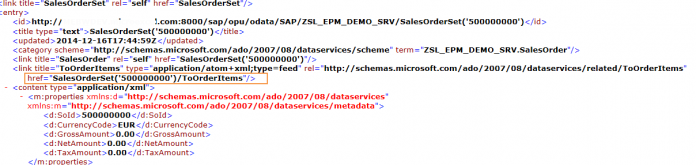
Once association and navigation are defined, you can access dependent data using the navigation property in the URI.
For example:
/sap/opu/odata/SAP/ZSL_EPM_DEMO_SRV/SalesOrderSet('500000000')/ToOrderItems
This URI fetches all items for the given Sales Order. However, executing it immediately may result in an error if backend methods are not enhanced to handle navigation calls.
Step 6: Enhance Dependent Entity Method
Open the Data Provider Extension class for the dependent entity (OrderItemsSet).
Locate and redefine the GET_ENTITYSET method.
The reason for enhancing this method is that the navigation request triggers it due to the 1..n cardinality of the dependent entity.
Step 7: Implement ABAP Logic for Navigation
Replace the existing code with logic to handle both scenarios: retrieving all items or items for a specific sales order. Example code:
DATA:      ls_max_rows   TYPE bapi_epm_max_rows,
           lv_so_id      TYPE bapi_epm_so_id,
           lt_orderitems TYPE TABLE OF bapi_epm_so_item,
           ls_orderitems TYPE bapi_epm_so_item,
           lwa_key_tab   TYPE /iwbep/s_mgw_name_value_pair,
           ls_entityset  TYPE zcl_zdemo_gw_srv_mpc=>ts_orderitems.* Get the Sales Order ID from request
READ TABLE it_key_tab INTO lwa_key_tab WITH KEY name = 'SoId'.
IF sy-subrc = 0.
  lv_so_id = lwa_key_tab-value.
ENDIF.* Retrieve first 20 items if no Sales Order ID
IF lv_so_id IS INITIAL.
  ls_max_rows-bapimaxrow = 20.
  CALL FUNCTION 'BAPI_EPM_SO_GET_LIST'
    EXPORTING
      max_rows   = ls_max_rows
    TABLES
      soitemdata = lt_orderitems.
  IF lt_orderitems IS NOT INITIAL.
    LOOP AT lt_orderitems INTO ls_orderitems.
      MOVE-CORRESPONDING ls_orderitems TO ls_entityset.
      APPEND ls_entityset TO et_entityset.
    ENDLOOP.
  ENDIF.
ELSE.
* Retrieve items for the specified Sales Order
  CALL FUNCTION 'CONVERSION_EXIT_ALPHA_INPUT'
    EXPORTING
      input  = lv_so_id
    IMPORTING
      output = lv_so_id.  CALL FUNCTION 'BAPI_EPM_SO_GET_DETAIL'
    EXPORTING
      so_id    = lv_so_id
    TABLES
      itemdata = lt_orderitems.
  IF lt_orderitems IS NOT INITIAL.
    LOOP AT lt_orderitems INTO ls_orderitems.
      MOVE-CORRESPONDING ls_orderitems TO ls_entityset.
      APPEND ls_entityset TO et_entityset.
    ENDLOOP.
  ENDIF.
ENDIF.
This implementation ensures proper retrieval whether the Sales Order ID is provided or not.
Step 8: Test Navigation
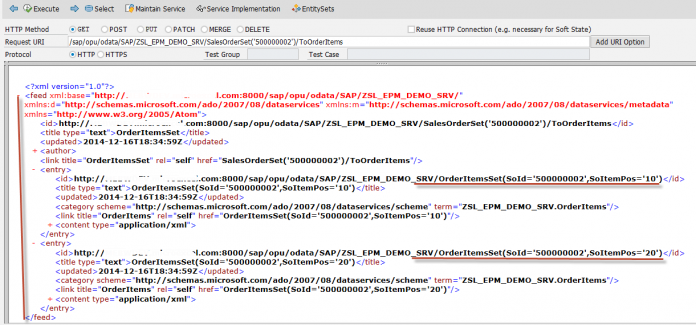
After activating the changes, execute the navigation URI in the Gateway Client:
/sap/opu/odata/SAP/ZSL_EPM_DEMO_SRV/SalesOrderSet('500000000')/ToOrderItems
You should now see only the items related to the specified Sales Order.
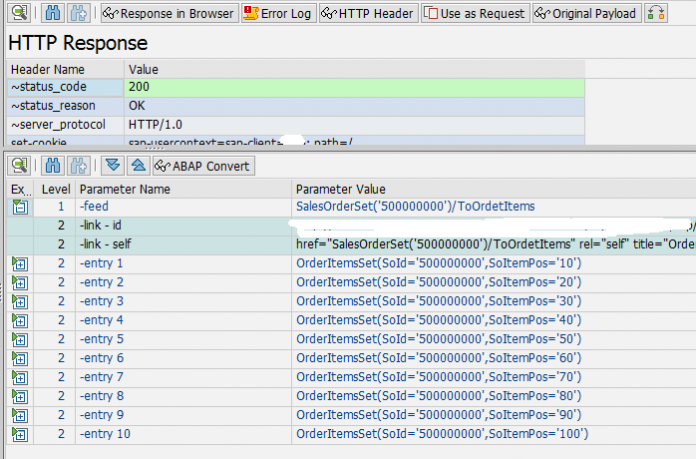
Key Benefits of Association and Navigation
Simplifies data retrieval in hierarchical relationships
Reduces multiple service calls
Supports frontend applications with structured data
Enables Fiori apps to display header and item details seamlessly
Improves performance by retrieving only relevant dependent records
Best Practices
Always define correct cardinality (1..1, 1..n)
Map key fields accurately
Enhance dependent entity methods as needed
Test navigation URIs thoroughly
Use limited rows during development for performance
Document associations and navigation properties for maintainability
Common Issues
Navigation returning empty results: Check key mapping and cardinality
Error on execution: Ensure dependent entity method is enhanced
Incorrect data: Validate conversion exits and field types
Performance issues: Use indexing and field selection
Conclusion
Implementing Association and Navigation in SAP OData services is essential for linking header and item entities, enabling intuitive data access, and supporting modern applications. By defining associations, creating navigation properties, and enhancing dependent entity methods, developers can create efficient, scalable, and user friendly OData services. Mastering these concepts strengthens SAP NetWeaver Gateway expertise and enables the delivery of high quality enterprise solutions.
YOU MAY BE INTERESTED IN
ABAP Evolution: From Monolithic Masterpieces to Agile Architects
A to Z of OLE Excel in ABAP 7.4


 WhatsApp us