

When building enterprise applications, users often need to view detailed information about one specific record instead of an entire dataset. In SAP environments, this requirement is handled efficiently through a single entity read in an OData service. A single record read allows applications such as Fiori apps, portals, mobile interfaces, and external integrations to fetch precise business data like one sales order, one customer, or one invoice. This guide explains how to implement a single record read in an SAP OData service using the GetEntity method in SAP NetWeaver Gateway, with clear steps, practical examples, and implementation tips.
Understanding Single Record Read in OData
An OData service supports two primary read operations. The first retrieves collections of records, and the second retrieves one specific record using key fields. The single record read operation is technically called GetEntity or Read Entity. It is triggered when a request is made using a key value in the service URL. For example, instead of requesting all sales orders, the system fetches one exact sales order using its unique identifier. This improves performance, reduces data transfer, and ensures precise information delivery to user interfaces.
In real business scenarios, this operation is heavily used. A finance executive opening one invoice, a sales manager checking a particular order, or a customer service agent reviewing a single ticket are all examples of single record reads. Efficient implementation ensures fast system response and accurate backend integration.
Prerequisites Before Implementation
Before implementing a single record read, ensure the following setup is complete. The OData project must already be created in the Service Builder transaction. The data model, entity types, and entity sets should be defined. Key fields must be properly maintained because they uniquely identify each record. The runtime artifacts should be generated so that the Data Provider Class and Model Provider Class are available for enhancement.
Step 1 Open the Service in Service Builder
Launch transaction SEGW and open your existing project. Select the service name created earlier. In this example, the project contains an entity set representing sales orders.
Expand the project tree and navigate to Service Implementation. This section contains all operations that handle runtime requests such as create, read, update, delete, and query.
Step 2 Navigate to GetEntity Method
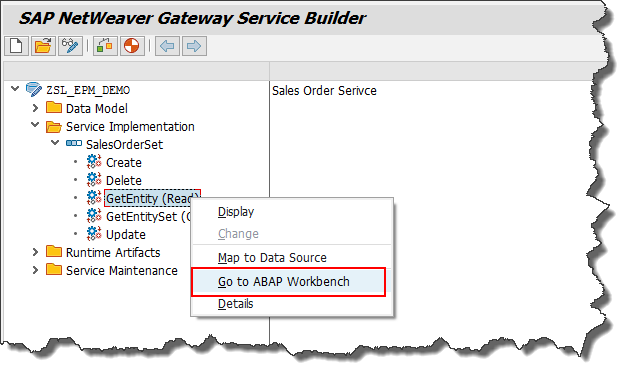
Inside Service Implementation, locate the entity set for which you want to implement the single record read. Expand the node and find GetEntity also known as Read operation.
Right click on GetEntity and choose Go to ABAP Workbench. The system will redirect you to the backend class where business logic is written.
Step 3 Redefine the Data Provider Class Method
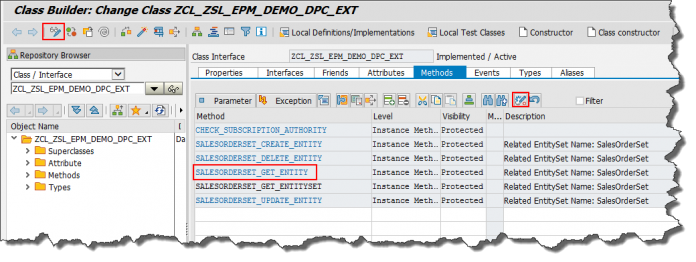
The system opens the Data Provider Extension Class. Locate the method responsible for handling the read operation. In a sales order example, the method name typically follows the pattern ENTITYSET_GET_ENTITY.
Click Redefine to implement custom logic. Redefinition allows developers to override the standard generated behavior and fetch real backend data.
Step 4 Understand the Method Signature
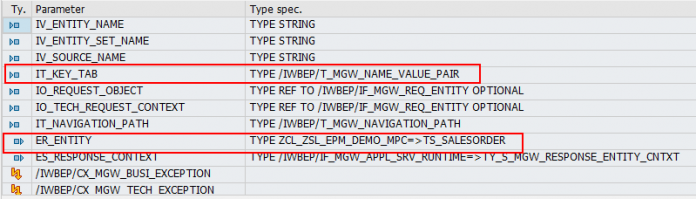
Before writing code, it is important to understand key parameters passed to the method.
IT_KEY_TAB contains key field names and their values from the request URL. If the entity uses Sales Order ID as a key, the value entered by the user will be stored here.
ER_ENTITY is the exporting structure that must be filled with data. The data placed in this structure becomes the service response.
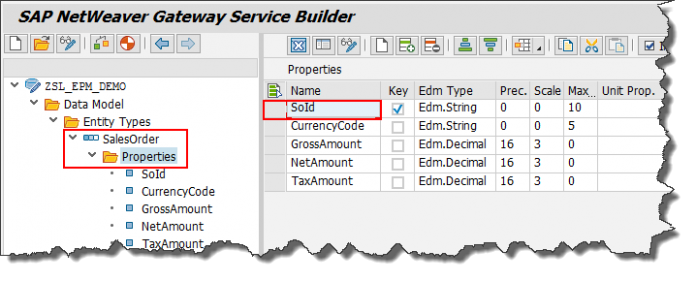
Understanding these parameters ensures correct data extraction and response mapping.
Step 5 Implement the ABAP Logic
Below is a practical implementation to fetch a specific sales order record from a database table.
DATA lwa_key_tab TYPE /iwbep/s_mgw_name_value_pair.
DATA lv_so_id TYPE snwd_so_id.
DATA lwa_sales TYPE snwd_so.
READ TABLE it_key_tab INTO lwa_key_tab WITH KEY name = ‘SoId’.
IF sy-subrc = 0.
lv_so_id = lwa_key_tab-value.
ENDIF.
CALL FUNCTION ‘CONVERSION_EXIT_ALPHA_INPUT’
EXPORTING
input = lv_so_id
IMPORTING
output = lv_so_id.
SELECT SINGLE * FROM snwd_so INTO CORRESPONDING FIELDS OF er_entity WHERE so_id = lv_so_id.
This logic performs four essential actions. It reads the key value from the request. It performs alpha conversion to maintain proper formatting. It fetches the record from the database. It maps the result into the response structure.
Step 6 Activate the Objects
After writing the code, save and activate the method. Then activate the Data Provider Extension Class. Activation ensures the service runtime uses the updated logic.
Inactive objects are a common reason for service failure, so always verify activation status.
Step 7 Test Using Gateway Client

Testing ensures your implementation works correctly before frontend integration.
Open transaction /IWFND/GW_CLIENT. This is the built in testing tool for OData services.
Enter the service URL using the entity set and key value. The URL format looks like this.
/sap/opu/odata/sap/ZSL_EPM_DEMO_SRV/SalesOrderSet(‘500000001’)
Execute the request.
Step 8 Validate the Response
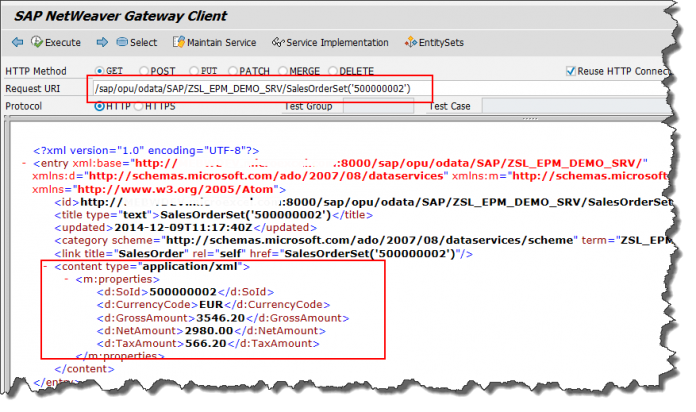
If implementation is correct, the system returns a structured response containing details of the requested sales order. The output is typically in XML or JSON format depending on request headers.
The response includes all fields mapped in the entity type such as order ID, buyer name, currency, net amount, and creation date.
Successful output confirms that the single record read is functioning correctly.
Real World Use Cases
Single record read is widely used across SAP applications.
Fiori detail screens fetch one object selected from a list.
Mobile approval apps retrieve one workflow item.
External systems integrate to fetch specific master data.
Analytics tools drill down into individual transactions.
Efficient implementation ensures smooth user experience and faster backend communication.
Performance Optimization Tips
Always select only required fields if the table is large.
Ensure database indexes exist on key fields.
Avoid unnecessary loops or nested selects.
Use proper conversion exits for formatted keys.
Activate buffering where suitable.
These practices significantly improve response time in production systems.
Common Errors and Fixes
If no data is returned, verify key field names match entity definitions.
If dump occurs, check null handling and type mismatches.
If service fails, confirm objects are activated.
If wrong record appears, validate conversion exits.
If authorization fails, maintain proper user roles.
Systematic troubleshooting helps maintain stable services.
Best Practices for Clean Implementation
Use meaningful variable names.
Keep logic modular and readable.
Handle exceptions gracefully.
Add comments for maintainability.
Follow naming conventions.
Transport changes properly across landscapes.
Clean code improves long term system health.
How Single Read Differs from Entity Set Read
Entity Set Read retrieves multiple records and supports filters and pagination. Single Read fetches exactly one record using a unique key. Entity Set is used for lists and dashboards. Single Read is used for detail pages and object views. Both are essential parts of OData services.
Integration with Modern SAP Applications
Modern user interfaces rely heavily on OData services. Applications built on platforms from SAP use these services to connect frontend and backend layers. A properly implemented single record read ensures seamless data flow between business logic and user interfaces.


 WhatsApp us