

Introduction to OData Service Structure
OData services play a very important role in modern SAP application development. They are widely used in SAP Fiori, SAPUI5 applications, and external integrations that require access to SAP business data. When developers create an OData service in SAP NetWeaver Gateway, the service follows a well defined structure that allows applications to access, understand, and interact with SAP data efficiently.
Understanding the structure of an OData service is essential for SAP ABAP developers and integration specialists. The structure defines how data is exposed, how different data elements are related, and how applications can retrieve or manipulate business information through HTTP based requests.
In SAP NetWeaver Gateway, every OData service mainly consists of two major components. These components help applications understand what data is available and how it can be accessed.
The two main parts of an OData service are the Service Document and the Service Metadata Document.
Service Document in OData
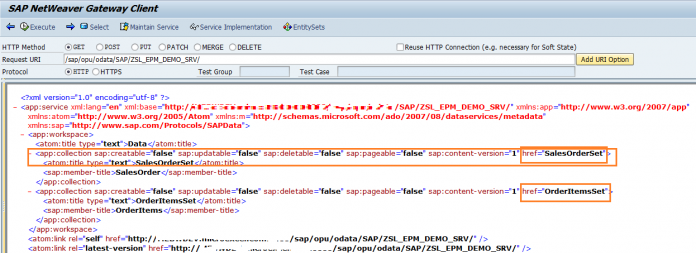
The Service Document is the entry point of an OData service. It provides a list of all available resources that can be accessed through the service. In simple terms, it acts like a directory that shows all the data collections available for interaction.
When an application or developer accesses an OData service URL, the service document returns a list of entity sets that are exposed by that service. Each entity set represents a collection of data that can be retrieved or modified.
For example, imagine an OData service created to manage sales orders in SAP. The service might include entity sets such as SalesOrders, Customers, and SalesOrderItems. The service document will list these entity sets along with their accessible resource paths.
Developers can access the service document simply by opening the base service URL in a browser or through SAP Gateway Client.
For example
/sap/opu/odata/sap/ZSL_EPM_DEMO/
In this example, ZSL_EPM_DEMO represents an OData service that may retrieve sales order related data. The service document will display all the collections that can be accessed through this service.
The service document helps developers quickly understand what resources are available without needing to analyze the backend implementation.
Service Metadata Document
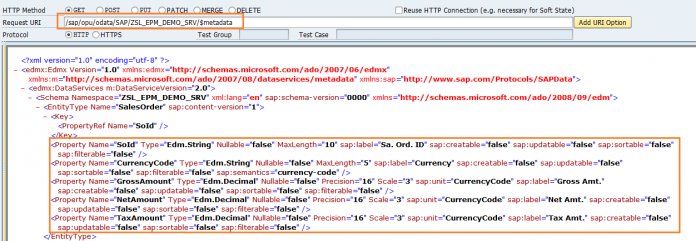
The Service Metadata Document contains detailed information about the structure of the data exposed by the OData service. While the service document lists available resources, the metadata document describes how those resources are structured.
The metadata document defines all entities, properties, relationships, and data types used in the service.
Developers can access the metadata document by adding the keyword metadata to the service URL.
For example
/sap/opu/odata/sap/ZSL_EPM_DEMO/$metadata
The metadata document is usually returned in XML format and follows a standard schema definition. It allows applications to automatically understand the structure of the service and interact with it without manual configuration.
This is extremely useful when building dynamic applications because user interfaces can automatically read the metadata and generate screens or data models accordingly.
The metadata document typically includes the following elements
Entity Types
Entity Sets
Properties
Associations
Navigation Properties
Each of these elements plays a specific role in defining how the OData service works.
Entity Type in OData
Entity Type is one of the most fundamental components of an OData service. It represents the structure of a single business object or data record.
In ABAP development terms, an Entity Type is similar to a work area or a structure that holds fields describing a single record.
For example, a Sales Order entity type may contain fields such as SalesOrderID, CustomerID, OrderDate, and TotalAmount.
Each of these fields is called a Property.
One important rule in OData is that every entity type must have at least one key property. The key uniquely identifies each record within the entity set.
For example, SalesOrderID can act as the key field for a Sales Order entity.
This allows applications to retrieve a specific sales order using a unique identifier.
Example URL
/sap/opu/odata/sap/ZSL_EPM_DEMO/SalesOrders(‘50000123’)
This request retrieves the data of a specific sales order.
Entity Set in OData
An Entity Set represents a collection of entities of the same type. It can be compared to an internal table in ABAP that contains multiple records of the same structure.
For example, if an entity type represents a single sales order, the entity set represents the entire list of sales orders stored in the system.
Applications can retrieve all records from an entity set using a simple HTTP request.
Example
/sap/opu/odata/sap/ZSL_EPM_DEMO/SalesOrders
This request returns all sales orders available in the system.
Entity sets are extremely useful because they allow developers to apply query operations such as filtering, sorting, and pagination when retrieving data.
For instance, developers can filter sales orders based on customer number or order date using query options.
Property in OData
Properties represent the individual fields within an entity type. They define the actual data elements that make up a business object.
Each property has a specific data type such as string, integer, decimal, or date. These data types help ensure that applications interpret the data correctly.
For example, a Sales Order entity type might include the following properties
SalesOrderID
CustomerID
OrderDate
TotalAmount
Currency
Each property corresponds to a column in the backend database or structure.
Properties are important because they determine what data will be exposed to external applications through the OData service.
When designing OData services, developers should carefully choose which properties to expose to ensure both security and performance.
Association in OData
Association defines the relationship between two different entity types.
In real business scenarios, many objects are related to each other. For example, a sales order may contain multiple sales order items.
To represent this relationship, OData uses associations.
An association defines how two entities are connected and specifies the cardinality between them.
For example
One Sales Order can have multiple Sales Order Items
This relationship can be represented as
SalesOrder 1 to many SalesOrderItem
Associations allow applications to understand how data objects relate to each other and retrieve related information when required.
Navigation Property in OData
Navigation properties are used to move between related entities based on the associations defined in the service.
Once an association is created between entity types, a navigation property allows applications to access related data through the service.
For example, suppose we have two entity types
SalesOrder
SalesOrderItem
If a navigation property is defined between them, developers can retrieve sales order items for a specific sales order using a navigation path.
Example
/sap/opu/odata/sap/ZSL_EPM_DEMO/SalesOrders(‘50000123’)/Items
This request retrieves all items that belong to the selected sales order.
Navigation properties make it easier for applications to traverse relationships between business objects without writing complex queries.
They are widely used in SAP Fiori applications where related information needs to be displayed together.
Real Example of OData Service Structure
Let us consider a practical example of an OData service used for managing sales orders.
The service might include the following elements
Entity Type SalesOrder
Properties SalesOrderID CustomerID OrderDate NetAmount
Entity Type SalesOrderItem
Properties ItemNumber ProductID Quantity Price
Entity Set SalesOrders
Entity Set SalesOrderItems
Association between SalesOrder and SalesOrderItem
Navigation Property linking SalesOrder to SalesOrderItems
Using this structure, applications can easily retrieve data such as
List of all sales orders
Details of a specific sales order
Items belonging to a sales order
This structured approach makes OData services extremely powerful and flexible for enterprise applications.
Why Understanding OData Structure is Important
Understanding the structure of an OData service helps developers build efficient and scalable APIs in SAP.
It allows developers to design services that expose only relevant data while maintaining performance and security.
A well designed OData service improves the performance of SAP Fiori applications and simplifies integration with external platforms.
It also helps developers troubleshoot issues related to data retrieval, navigation, and service responses.
When developers understand entity types, entity sets, and navigation properties, they can create services that are easier to maintain and extend in the future.
Best Practices for Designing OData Services
SAP developers should follow certain best practices while designing OData services.
Always define clear and meaningful entity names so that the service is easy to understand.
Use appropriate key fields to uniquely identify records.
Expose only necessary properties to avoid unnecessary data transfer.
Define proper associations and navigation properties to simplify data retrieval.
Test services using SAP Gateway Client before integrating them with applications.
Following these practices ensures that OData services remain efficient and easy to maintain.
Conclusion
The structure of an OData service in SAP NetWeaver Gateway provides a standardized way to expose business data to external applications. It mainly consists of the service document and the service metadata document, which together describe the available resources and their structure. Key components such as entity types, entity sets, properties, associations, and navigation properties define how data is organized and accessed within the service. By understanding these elements, SAP developers can design powerful OData services that support modern applications such as SAP Fiori, mobile apps, and web platforms. A clear understanding of the OData service structure is therefore essential for anyone working with SAP Gateway and modern SAP integration technologies.
YOU MAY BE INTERESTED IN
How to Convert JSON Data Structure to ABAP Structure without ABAP Code or SE11?
ABAP Evolution: From Monolithic Masterpie


 WhatsApp us