

Unlocking the Power of OmniStudio Integration Processes
Salesforce OmniStudio integration processes are powerful tools designed to help organizations streamline and automate their business processes by integrating with various external systems. This guide will provide you with detailed information about integration processes, including their key features, building blocks, and best practices.
Introduction:
Salesforce OmniStudio integration processes are server-side processes that enable complex data transformations and seamless integration with external systems. These processes allow businesses to streamline multiple actions within a single transaction, ensure data consistency, and improve operational efficiency.
Key Features
- Declarative Configuration: Create integration processes using a user-friendly interface without requiring extensive coding knowledge.
- Reusability: Develop reusable integration processes that can be utilized across multiple applications and business processes.
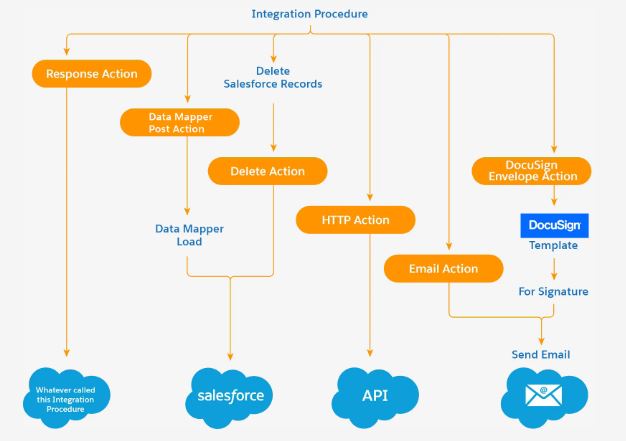
- Data Source for Multiple Technologies: Integration processes serve as data sources for various technologies.
- Performance Optimization: Efficiently handle complex data transformations and integrations by reducing API callouts and process times.
- Error Management: Robust error handling mechanisms to manage exceptions and ensure data integrity.
- Security: Leverage Salesforce’s security model to ensure data protection and compliance with industry standards.
How to Create Integration Processes
Sign Up for OmniStudio/Vlocity Developer Edition
If you are reading about OmniStudio for the first time, here’s how to request it: Sign up for a Developer Edition org to access special offers.
- Navigate to the OmniStudio/Vlocity Integration Process:
- Go to the OmniStudio application within Salesforce.
- Select the “Integration Process” option or search for it in the App Launcher.
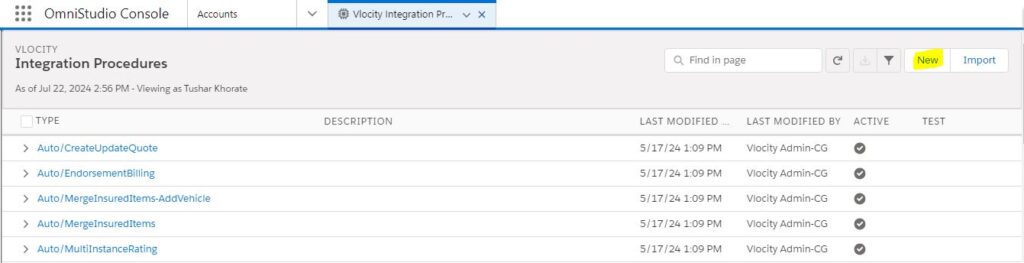
Creating a New Integration Process in OmniStudio
To set up a new integration process in OmniStudio, follow these steps:
- Create a New Integration Process:
- Click the “New” button to start the creation of a new integration process.
- Provide a name and description for your integration process to clearly define its purpose.
- Add Components to the Process:
- Use the drag-and-drop interface to add components such as Data Wrappers, HTTP Actions, Remote Actions, Loop Blocks, and Conditional Blocks.
- Configure each component with the necessary parameters and logic to meet your business requirements.
- Define Response Structure:
- Add response actions to specify the data returned by the integration process.
- Map the output fields to ensure the correct data is sent back to the calling service.
- Test and Activate:
- Test the integration process to ensure it functions as expected.
- Activate the integration process to make it available for use in your applications.
Building Components
- DataRaptor/DataMapper:
- A tool used for extracting, transforming, and loading data within the integration process. It allows you to manipulate data to meet the needs of your business workflows.
- HTTP Actions:
- Enable real-time data synchronization by making HTTP callouts to external systems. This allows your integration processes to communicate seamlessly with other applications and services.
- Remote Actions:
- Call Apex classes or other Salesforce services to handle complex logic or data processing tasks. This helps you incorporate advanced functionality within your integration processes.
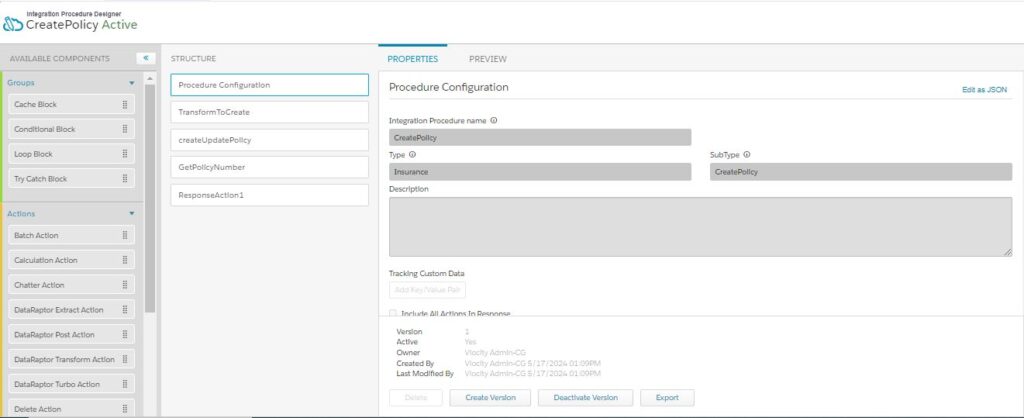
IP Configuration
- Loop Block: Iterate over a collection of records to perform various operations on each record.
- Conditional Block: Implement actions based on specific conditions, providing flexibility in the process logic.
- Response Action: Define the structure of the response returned by the integration process, ensuring that the correct data is delivered to the calling service.
you may be interested in this blogs:
Charting a Course to ROI: Navigating Intent Data Challenges Effectively
BOOST YOUR BUSINESS WITH THE RIGHT SAP BUSINESS ONE PARTNER
Taking Center Stage: Deploying and Optimizing SAPUI5 Apps for Prime Performance
What is Salesforce QA testing?
Future of VDM: Charting a Course in a Cloud-Powered World
What Does CRM Stand For and What Does it Mean for My Business?


 WhatsApp us